
20 Smart Plug Automation Ideas
for Daily Life
From your morning coffee to your midnight security lights — here are 20 real automations you can set up today, organized by time of day.
🌿 Afternoon Habits
🌆 Evening Wind-Down
🌙 Overnight Automation
Smart plugs don’t just turn things on and off. They put your home on autopilot. Once you set up an automation — a schedule, a routine, a trigger — it runs every single day without you thinking about it.
That’s the real value. Not the novelty of voice commands.
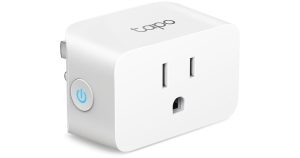
Here are 20 genuinely useful smart plug automations — organized from the moment your alarm goes off to the moment you fall asleep. Each one takes about 5 minutes to set up and works with any budget smart plug from Kasa, Wyze, or Tapo.
All of these automations work with any Wi-Fi smart plug — no hub required. You just need a plug (starting at ~$6), the manufacturer’s app, and your home Wi-Fi. Some routines also work with Alexa or Google Home for voice triggering.
Time Saver
Schedule your drip coffee maker to switch on at 6:45 AM — 15 minutes before your alarm. Walk into the kitchen to a fresh, hot pot every single morning with zero effort after day one.
In your app (Kasa, Wyze, or Tapo), go to Schedule → Add Schedule → Turn On at 6:45 AM, Mon–Fri. Set Turn Off at 8:00 AM to avoid burning the pot. Done.
Sleep Hack
Plug a bedside lamp into a smart plug and schedule it to switch on at 6:30 AM — before your alarm rings. Natural light gently signals your body to start waking up, making the alarm feel less jarring. Far cheaper than a dedicated sunrise alarm clock.
Schedule the lamp smart plug to turn on 20–30 minutes before your alarm time. Use a warm-toned bulb (2700K) for the most natural effect. Pair with Alexa routine: “Alexa, Good Morning” → turns on lamp + starts coffee.
Comfort Boost
In winter, stepping onto a cold bathroom floor is miserable. Schedule a small bathroom fan heater (if rated under 1800W — always verify) to switch on 10 minutes before your usual shower time. Step into a warm bathroom every morning.
⚠️ Important: Only use a smart plug with a heater if the heater is rated at 1500W or less AND the plug is rated for continuous high-load use. Set a strict auto-off time — never leave heating unattended without an automatic shutoff.
Save Energy
Create a voice routine called “Hey Google, I’m leaving” that turns off every non-essential smart plug in one command — living room lamp, bedroom fan, bathroom heater, office monitor. Never pay for standby power on devices you forgot to turn off.
In Google Home or Alexa app → Routines → Create Routine → Trigger: “I’m leaving” → Actions: Turn Off [all your smart plugs by name]. Takes 3 minutes to set up, saves money every day.
Save $30/yr
Your desktop monitor, speakers, and desk lamp together consume 10–25 watts in standby even when your PC is sleeping. Schedule them to cut power completely between 8 PM and 7 AM, saving real money over the year.
Plug your monitor/desk gear into a smart plug. Schedule: Turn Off at 8:00 PM, Turn On at 7:00 AM. With a plug that has energy monitoring (like Tapo P110), you can first check exactly how much standby power you’re cutting.
Focus Aid
Plug a colored desk lamp or a simple red bulb into a smart plug. When you start a deep work session, say “Alexa, focus mode on” to turn on the lamp as a visual signal to family or roommates: don’t interrupt. Turn it off with “focus mode off.”
Create an Alexa Routine: Trigger — “focus mode on” → Action — Turn On [desk signal lamp]. Create a second routine: “focus mode off” → Turn Off. Optional: set a 90-minute auto-off timer so it doesn’t stay on if you forget.
Peace of Mind
Forgot to turn off the iron? Left the curling iron on? Open your app and turn it off from anywhere in the world. This remote-off capability alone is worth the price of a smart plug for millions of users — it eliminates that “did I leave something on?” anxiety permanently.
No special setup needed. Just make sure your plug is connected to Wi-Fi. Open the Kasa, Wyze, or Tapo app on your phone → tap the device → tap Off. Works from any location with cell or Wi-Fi signal.
08 Automate Fan Cooling Before You Return Home
Comfort Boost
Schedule your living room fan or window AC unit to switch on 30 minutes before your usual arrival time. Walk into a cool, comfortable home instead of a hot stuffy one — without leaving it running all day.
Schedule: Turn On at 5:00 PM (or whenever you typically arrive), Turn Off at 10:00 PM. Or use a more advanced trigger: Alexa Routines with “Alexa, I’m home” as the trigger to turn on the fan when you walk in the door.
Family Care
If you have elderly parents or relatives at home, set up smart plugs to remotely control their kettle, lamp, or TV. Check whether devices are on (indicating normal activity) or turn them off if left running too long. Simple caregiving from a distance.
How to Set It Up
Share device access with a family member’s account in the Kasa or Wyze app (both support device sharing). Set safety auto-off timers on high-risk appliances. Check the app activity log to see usage patterns.
standby power/yr
vs always-on
gear scheduling/yr
Ambiance
Schedule your living room or porch lamps to turn on at sunset automatically. Most smart plug apps let you use local sunrise/sunset times as schedule triggers instead of fixed times — so the lighting adjusts naturally throughout the year.
In the Kasa app: Schedule → Add → Use “Sunset” as the trigger time (Kasa automatically calculates local sunset). Set Turn Off at 11:00 PM or whenever you go to bed. Your lamps now follow the sun year-round.
Save $40/yr
Your TV, cable box, gaming console, and soundbar together consume 30–50 watts in standby — constantly, 24 hours a day. Plug your entertainment center into a smart plug (or smart power strip) and schedule a hard power cut from 1 AM to 10 AM daily.
Use a single smart plug on your entertainment unit’s power strip. Schedule: Turn Off at 1:00 AM, Turn On at 10:00 AM. Pair with energy monitoring (Tapo P110) to see the exact savings in your monthly report.
Host Hack
Create a “Dinner time” Alexa routine: dim lamps switch on, accent lights turn on, kitchen bright lights turn off — all from a single voice command when guests arrive. Impress every time without touching a single switch.
Alexa Routines: Trigger — “dinner time” → Actions — Turn On [dining lamp], Turn Off [kitchen overhead plug], Turn On [accent lamp]. Stack multiple smart plug actions in one routine. Takes about 5 minutes to create.
Battery Health
Charging your phone to 100% every night and leaving it plugged in degrades battery health over time. Schedule your phone charger smart plug to turn off after 90 minutes — typically enough to reach 80% — extending your battery’s lifespan by months.
Use the Countdown timer in your app instead of a fixed schedule. Plug in your phone at bedtime → activate a 90-minute countdown → charger cuts off automatically. Or use a fixed schedule: On at 10 PM, Off at 11:30 PM.
Parenting Win
Stop fighting about screen time. Schedule your kids’ TV, game console, or tablet charger to automatically cut power at 8:00 PM on school nights. No arguments — the devices just turn off. Parents who use this report it eliminates 90% of bedtime negotiations.
Schedule the smart plug connected to the TV or gaming console: Turn Off at 8:00 PM Sun–Thu, Turn On at 3:00 PM Mon–Fri (after school). Weekend schedule can be different. The kids can’t override it without the app password.
The most powerful automations happen when you stack several smart plugs into a single “Goodnight” routine. One command at bedtime can turn off the living room lamp, cut the TV power, start the bedroom fan, and turn on the porch security light — simultaneously.
Home Security
Burglars look for homes with no signs of activity. Schedule 2–3 lamps to switch on and off at random-ish intervals throughout the evening while you’re away on vacation — simulating natural home activity. The Kasa app has a built-in “Away Mode” that does this automatically.
In the Kasa app → Device Settings → Away Mode → Enable. The app will randomly vary on/off times within the window you set (e.g., 6 PM–11 PM). Alternatively, create multiple schedules with slightly different times on different days.
Fan Favorite
The most popular smart home automation of all. Say “Alexa, goodnight” from your bed and watch the living room lamp turn off, the TV power cut, the fan turn on, and the porch light switch on — all in one command. Never get out of bed to check switches again.
Alexa Routines → Create → Trigger: “goodnight” → Add Actions: Turn Off [living room lamp], Turn Off [TV plug], Turn On [bedroom fan], Turn On [porch light]. Takes 5 minutes. Works every single night.
Save Energy
Most people fall asleep within 30–45 minutes but leave their fan running all night unnecessarily. Schedule your bedroom fan to turn off 1 hour after your bedtime. You get the cooling effect while falling asleep without running the fan until 6 AM.
Use a countdown timer: when you get into bed, activate a 60-minute countdown on the bedroom fan smart plug. Or set a fixed schedule: Turn Off at 11:30 PM, Turn On at 5:45 AM (just before you wake up).
Set and Forget
Holiday lighting is the #1 “set it and forget it” use case for smart plugs. Schedule outdoor Christmas, Halloween, or porch string lights to turn on at sunset and off at midnight — automatically, every day, without you ever touching a switch or extension cord timer.
Use a weatherproof outdoor smart plug (Kasa KP401 or Wyze Plug Outdoor) for exterior lights. Set Schedule: On at Sunset, Off at 11:59 PM. For both indoor and outdoor displays, you can control everything from one app.
Data-Driven Saving
Plug your refrigerator, washing machine, or home office setup into an energy monitoring smart plug (like Tapo P110 or Wyze) for one month. The data will tell you exactly which appliances are costing the most — and help you decide which automations deliver the biggest savings.
Plug the device in → open app → go to Energy Monitor → set your local electricity rate (cents per kWh). After 30 days, check the monthly cost report. Most users are shocked by how much their entertainment center consumes in standby.
Hobbyist Win
Fish, coral, and plants need consistent light cycles to thrive — exactly 10–12 hours of light per day, every day, at the same time. A smart plug schedule is the most reliable and affordable way to deliver this, outperforming mechanical outlet timers that drift over time and fail unpredictably.
Schedule: Turn On at 8:00 AM, Turn Off at 8:00 PM (12-hour cycle). Because smart plug schedules are stored digitally, they don’t drift like mechanical timers. No manual adjustment needed when daylight saving time changes — update the app in 10 seconds.
Quick Questions Answered
The most common questions about smart plug automations.
Ready to Set Up Your First Automation?
Start with the right smart plug. Our buying guide reviews the best budget options — all under $15 and ready to automate today.