
An air purifier is an investment in your health and comfort, but like any appliance, it requires regular maintenance to perform at its best. Proper care ensures that your unit continues to effectively remove pollutants, allergens, and odors from your indoor air. This comprehensive guide provides detailed steps, troubleshooting tips, expert advice, and pro tips to help you maintain and clean your air purifier, extending its lifespan and optimizing its performance.
Why Air Purifier Maintenance Matters
Maintaining your air purifier is not just about keeping it clean; it’s about ensuring optimal performance and protecting your health. Over time, filters collect dust, pet dander, pollen, smoke, and other microscopic particles. Neglecting maintenance reduces airflow, makes the unit work harder, and can even compromise indoor air quality.
Key benefits of proper maintenance:
- Optimal Performance: Clean filters allow unrestricted airflow, letting your purifier remove particles efficiently.
- Health Benefits: Well-maintained purifiers reduce allergens, bacteria, and mold spores, improving respiratory health.
- Extended Lifespan: Regular care prevents premature wear and keeps the unit functioning for years.
- Energy Efficiency: Clean components reduce power consumption and keep operating costs low.
Step-by-Step Guide to Cleaning Your Air Purifier
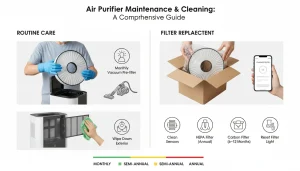
1. Turn Off and Unplug the Unit
Always start by switching off your purifier and unplugging it. This prevents electrical hazards and ensures safe cleaning.
2. Remove and Inspect Filters
Air purifiers often contain multiple filters:
- Pre-filters: Capture large particles like dust, hair, and lint.
- HEPA filters: Trap microscopic particles, including pollen, smoke, and pet dander.
- Activated carbon filters: Absorb odors and volatile organic compounds (VOCs).
- UV-C or ionization modules: Neutralize germs and bacteria in some advanced units.
Inspect each filter for visible dirt, damage, or unusual odors.
3. Clean the Pre-Filter
Pre-filters often catch the most debris and are typically washable:
- Vacuuming: Use a soft brush attachment to remove dust.
- Washing: Rinse under cool water. Avoid soap unless specified. Let it air dry completely.
Pro Tip: Monthly pre-filter cleaning keeps HEPA filters from clogging and reduces energy consumption.
4. Clean or Replace HEPA Filters
HEPA filters usually cannot be washed:
- Vacuuming: Gently remove surface dust with a soft brush attachment.
- Replacement: Replace every 6–12 months, depending on usage and environment. HEPA filters exposed to pets or smoke may require earlier replacement.
Expert Advice: Never attempt to wash a HEPA filter unless the manufacturer explicitly allows it — doing so can damage the fibers and reduce efficiency.
5. Maintain Activated Carbon Filters
Activated carbon filters absorb gases and odors and usually cannot be washed:
- Sunlight Refresh: Place the filter in indirect sunlight for 2–3 hours to help release trapped odors.
- Replacement: Replace every 3–6 months, or sooner if odors persist.
Pro Tip: If your home experiences strong odors, such as cigarette smoke or kitchen fumes, consider a second carbon filter to maintain freshness.
6. Clean UV-C Lights and Ionizers
UV-C light modules kill bacteria and viruses, while ionizers charge particles to trap them. For these:
- UV-C Bulbs: Wipe with a dry cloth. Replace bulbs annually or according to manufacturer recommendations.
- Ionizers: Gently clean collector plates or surfaces as instructed. Avoid using water unless the manual allows.
Safety Tip: Always wear gloves and avoid direct contact with UV-C bulbs.
7. Clean the Exterior and Air Vents
Dust and debris accumulate on the outer shell and vents, reducing airflow:
- Wipe Down Surfaces: Use a soft, damp cloth. Avoid chemical cleaners.
- Clean Vents: Use a soft brush or compressed air to remove dust from intake and exhaust vents.
Expert Advice: Keeping vents clean prevents overheating and maintains airflow efficiency.
8. Reassemble and Test the Unit
After cleaning:
- Reinstall all filters and components correctly.
- Ensure panels and covers are secure.
- Plug in the unit and run it to check for unusual sounds or error codes.
Troubleshooting Common Problems
1. Reduced Airflow
- Cause: Clogged or dirty filters.
- Solution: Clean pre-filters and replace HEPA/carbon filters as needed.
2. Persistent Odors
- Cause: Saturated carbon filter.
- Solution: Replace carbon filters and clean surrounding vents.
3. Strange Noises
- Cause: Loose components or debris inside.
- Solution: Check filter placement, tighten panels, and remove any trapped particles.
4. Indicator Lights or Error Codes
- Cause: Overdue maintenance or sensor issues.
- Solution: Clean sensors and reset the unit according to the manual.
5. Excess Moisture or Dust Escape
- Cause: Improper filter seating or damaged seals.
- Solution: Reinstall filters properly and inspect seals for damage.
Pro Tip: Keep a log of filter replacement and cleaning dates to prevent maintenance oversight.
Maintenance Tips for Prolonged Efficiency
- Establish a Routine: Schedule cleaning every 2–4 weeks for pre-filters and monthly for exterior vents.
- Monitor Usage Environment: Homes with pets, smokers, or high pollution levels may need more frequent maintenance.
- Keep the Area Clean: Dust the surrounding room regularly to minimize the load on your purifier.
- Use Genuine Filters: Always use manufacturer-recommended filters to maintain performance and warranty.
- Run on Auto Mode: Many purifiers adjust fan speed automatically, reducing unnecessary wear.
Expert Advice & Safety Recommendations
- Avoid Water on Non-Washable Filters: Introducing moisture can destroy HEPA or carbon filters.
- Wear Gloves When Handling Used Filters: Trapped allergens and dust can irritate skin or trigger asthma.
- Keep Away from Walls: Maintain at least 6–12 inches of clearance to ensure airflow.
- Ventilate During Cleaning: Dust and particles can become airborne during maintenance — keep windows open if possible.
- Check for Recalls: Occasionally, manufacturers issue recalls for safety or performance issues. Stay updated.
Conclusion
Regular maintenance and cleaning are essential for keeping your air purifier operating efficiently and effectively. By following this comprehensive guide, you can:
- Maximize air cleaning efficiency
- Protect your family from allergens and pollutants
- Extend the life of your purifier
- Ensure energy-efficient operation
A well-maintained air purifier is an investment in both your health and comfort, offering consistently clean and breathable air. Make maintenance a routine, stay vigilant for filter changes, and enjoy the peace of mind that comes with optimal indoor air quality
FAQs:
Air Purifier Maintenance & Cleaning
1. How often should I clean my air purifier?
Regular maintenance helps your purifier work efficiently and last longer.
-
Pre-filters: Clean every 2–4 weeks to remove dust, hair, and large particles.
-
HEPA/Carbon Filters: Replace or clean every 6–12 months, or sooner if your unit has a sensor alert.
-
Exterior & Vents: Wipe down monthly or whenever you notice buildup to prevent airflow blockages.
2. Can I wash my HEPA filter?
Only if the manufacturer specifically allows it. Most HEPA filters are not washable, as water can damage the fine fibers that trap pollutants. Instead, vacuum the surface gently using a soft brush attachment to remove surface dust and extend filter life.
3. How do I know when to replace a filter?
Common signs your filter needs replacing include:
-
Noticeably weaker airflow even after cleaning.
-
Persistent odors that don’t go away after running the purifier.
-
Visible discoloration or damage to the filter surface.
-
Sensor alerts or indicator lights from your device.
Replacing filters on time ensures your air purifier continues to capture allergens and pollutants effectively.
4. Can I use non-branded filters?
It’s best to stick with manufacturer-approved filters. Generic or off-brand filters may not fit properly, reduce purification efficiency, or even void your warranty. OEM filters are designed to match your purifier’s airflow system and filtration standards, ensuring optimal performance and longevity.
5. What if my air purifier makes a buzzing sound?
A buzzing or rattling sound could mean loose panels, trapped debris, or fan issues. Turn off and unplug the purifier, then:
-
Check for loose screws or parts.
-
Remove debris from around the fan or filter compartment.
-
If noise continues, contact customer support — a motor or fan imbalance may need professional repair.
6. Is it safe to clean UV-C bulbs myself?
Yes, but always unplug the unit before cleaning. Gently wipe the bulb with a soft, dry cloth to remove dust — never use water or harsh cleaners. Avoid touching the glass directly with your skin. Most UV-C bulbs should be replaced annually or as recommended by the manufacturer.
7. How can I prevent mold in my air purifier?
Mold can form when moisture builds up inside the purifier. To prevent this:
-
Clean pre-filters regularly and ensure they dry completely before reinstalling.
-
Empty and dry condensation trays (if your unit has them).
-
Avoid using the purifier in overly humid rooms unless it’s designed for such environments.
Regular cleaning keeps air pathways dry and mold-free.
8. Should I clean my Air Purifier Maintenance more often in winter?
Yes. During winter, dry indoor air and increased heater use stir up more dust and pet dander. Because doors and windows are usually closed, pollutants stay trapped inside. Cleaning filters more frequently helps maintain healthy air quality during high-use months.
9. Can dust escape back into the room during cleaning?
Yes, it can. When removing or vacuuming filters, dust particles can be released back into the air. To avoid this:
-
Wear a mask while cleaning.
-
Clean filters outdoors or in a well-ventilated area.
-
Gently tap the filter or use a vacuum with a HEPA attachment to contain dust particles effectively.
10. Does maintenance affect warranty?
Absolutely. Manufacturers often require regular cleaning and timely filter replacement as part of warranty conditions. Neglecting maintenance, using unauthorized parts, or improper cleaning methods can void your warranty. Always follow your purifier’s official maintenance schedule to stay covered.