
Why Smart Home Devices Are So Popular
Imagine waking up while your bedroom lights gradually brighten before your alarm rings. Meanwhile, your coffee maker starts brewing, the thermostat adjusts the temperature, and you can check your front door from your phone. It may sound futuristic. However, smart home devices are now a practical part of modern living. Best of all, you don’t need to turn your entire house into a high-tech showroom. In fact, a single smart plug, smart bulb, or security camera can make your daily routine more convenient. Smart home technology has also become easier to use.
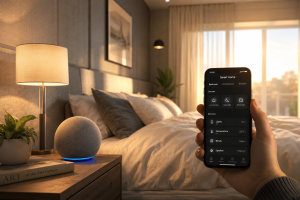
For example, many products connect through Wi-Fi, Bluetooth, Matter, Zigbee, or Thread. As a result, you can control lights, appliances, security devices, and other products through apps, voice assistants, schedules, and automation routines. At the same time, choosing the right products can be confusing. There are countless options available, and not every smart gadget offers meaningful value.So, which smart home devices are genuinely useful? How do they work? And what should you consider before spending your money? Let’s take a closer look.
What Are Smart Home Devices?
Smart home devices are connected electronic products that can be monitored, controlled, or automated through a network. Instead of operating everything manually, you can use a smartphone, voice assistant, timer, sensor, or automation routine.
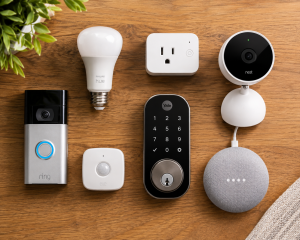
Common examples include:
- Smart lights
- Smart plugs
- Smart thermostats
- Smart security cameras
- Video doorbells
- Smart locks
- Smart speakers
- Motion sensors
- Door and window sensors
- Smart appliances
- Robot vacuums
The term “smart” doesn’t necessarily mean complicated. Usually, it simply means that an ordinary household product has gained additional control or automation features. For instance, a smart plug can turn a regular lamp into a remotely controlled device. After that, you can schedule the lamp, switch it off from your phone, or include it in an automated routine.
How Do Smart Home Devices Work?
Most smart home devices communicate using wireless technologies or smart-home protocols. Generally, a basic setup includes three main components:
- The device — such as a smart plug, bulb, camera, or sensor.
- The connection — such as Wi-Fi, Bluetooth, Zigbee, or Thread.
- The control platform — such as a smartphone app, smart speaker, hub, or home automation system.
For example, you can connect a smart plug to your home network and control it through an app. Then, you can create a schedule that turns a lamp on every evening. More advanced systems allow several products to work together. For instance, a motion sensor can detect movement, switch on a hallway light, and send an alert to your phone. This is where smart home automation becomes especially useful. Rather than controlling every device separately, you can create routines that happen automatically. The Most Useful Smart Home Devices Not every connected gadget is worth buying. While some products provide genuine value, others are mainly designed to offer novelty.
With that in mind, these are some of the most practical categories to consider.
- Smart Plugs
Smart plugs are one of the easiest ways to start building a smart home. Once connected, a smart plug can give an ordinary appliance or lamp remote control and automation features. Depending on the model, you may be able to:
- Turn devices on and off remotely
- Create schedules
- Set timers
- Monitor electricity usage
- Build automation routines
- Control compatible devices with voice commands
For beginners, smart plugs are especially useful because installation is simple. Moreover, you can automate existing appliances without replacing them.
- Smart Lights
Smart lights are another popular starting point. With compatible bulbs, you can adjust brightness, set schedules, change colors, or create lighting scenes for different situations. For example, you might create a relaxed lighting scene for movie night. Meanwhile, brighter lights can activate automatically in the morning to help you start the day. However, the best smart lighting setup isn’t necessarily the one with the most colors or effects. Instead, it should make your everyday routine easier.
- Smart Security Cameras
Home security is one of the biggest reasons people choose smart home devices. Smart security cameras can let you monitor your property, receive motion alerts, and check what’s happening while you’re away.
Depending on the model, useful features may include:
- Two-way audio
- Night vision
- Motion detection
- Person detection
- Cloud recording
- Local storage
- Activity zones
Before buying, check the storage options, privacy controls, subscription fees, and compatibility with your current smart-home system.
- Video Doorbells
A video doorbell combines a traditional doorbell with a camera and, often, motion detection. As a result, you can see who is at your door without physically opening it. Some models also allow two-way communication. Therefore, you can speak with visitors, delivery drivers, or guests even when you’re away from home. For busy households, that extra convenience can be extremely useful.
- Smart Locks
Smart locks can replace or complement traditional locks. Depending on the model, you may be able to unlock your door with:
- A smartphone
- A PIN code
- A fingerprint
- A physical key
- An automated access schedule
Some systems also allow temporary access for guests or service providers. However, smart locks involve an important part of your home’s security. For that reason, reliability, backup entry methods, and security features should matter more than flashy extras.
- Smart Thermostats
Smart thermostats can improve temperature control in homes with compatible heating or cooling systems. For example, you can create temperature schedules or adjust settings remotely when you’re away. Some models can also learn household patterns or use separate sensors to improve comfort in different rooms. Nevertheless, compatibility should always come first. A thermostat with impressive features is of little value if it doesn’t work properly with your existing system.
- Smart Sensors
Smart sensors may not be as exciting as cameras or smart speakers. Even so, they can be incredibly useful.
Common examples include:
- Motion sensors
- Door and window sensors
- Temperature sensors
- Water leak sensors
- Occupancy sensors
- Light sensors
These devices often act as triggers for automations. For instance, when a door opens after sunset, a hallway light can turn on automatically. Similarly, a water leak sensor can send an alert when moisture is detected near a washing machine or sink In practice, small automations like these can make a smart home feel much more useful.
Benefits of Smart Home Devices
Why are so many homeowners interested in smart home technology? The biggest reason is simple: convenience. Smart devices can reduce repetitive tasks and give you more control over your home.
Convenience
You can control lights, appliances, locks, and other products without physically operating each one. For example, instead of walking downstairs to check a light, you can switch it off from your phone. Likewise, scheduled routines can handle repetitive tasks automatically.
Energy Management
Smart home devices can also help you manage energy use. For instance, you can schedule selected lights or appliances to turn off at certain times. In addition, some smart plugs and appliances provide energy-monitoring features. As a result, you may gain a clearer understanding of where electricity is being used and where unnecessary consumption can be reduced.
Home Security
Security is another major advantage. Smart cameras, doorbells, locks, and sensors can improve your awareness of what is happening around your property. For example, you might receive a motion alert while you’re at work and quickly check the associated camera. Still, smart devices should complement basic security practices rather than completely replace them.
Accessibility
Smart technology can also make daily tasks easier for people who benefit from hands-free or remote controls. For example, voice commands, automatic lighting, remote access, and scheduled routines can reduce the need for physical interaction. Therefore, smart home technology isn’t only about convenience. It can also make a home more accessible.
Everyday Comfort
Sometimes, the most valuable benefits are the smallest ones. A hallway light can turn on as you walk through the house, a fan can switch off after you fall asleep, and a sensor can alert you to a water leak before it becomes a larger problem. Over time, these little improvements can make your home feel noticeably more comfortable.
How to Choose the Right Smart Home Devices
With so many products available, shopping can become overwhelming.
Therefore, start with a problem you want to solve rather than a gadget you simply want to own.
Step 1: Identify Your Goal First, ask yourself: What do I want this device to improve?
Perhaps you want better security. Alternatively, maybe you want easier lighting control or a more efficient way to manage appliances.
Once you know your goal, choosing the right product becomes much easier.
Step 2: Check Compatibility
Compatibility is one of the most important factors when buying smart home devices.
Before making a purchase, check whether the product works with your current platform and devices.
Depending on your setup, that might include ecosystems such as Amazon Alexa, Google Home, Apple Home, or other compatible platforms.
In addition, support for standards such as Matter can be useful for building a more flexible setup.
Otherwise, you could end up with several devices that work individually but don’t communicate well with one another.
Step 3: Consider Your Wi-Fi Network
Your network plays an important role in smart-home reliability.
If your Wi-Fi coverage is weak, cameras, plugs, and other connected products may disconnect or respond slowly.
For larger homes, improving network coverage may therefore be more valuable than purchasing additional gadgets.
Step 4: Pay Attention to Privacy and Security
Convenience should never come at the expense of basic security.
Before buying an internet-connected device, look for:
- Strong account protection
- Two-factor authentication
- Regular firmware updates
- Clear privacy policies
- Reasonable data practices
- Local storage options when appropriate
Additionally, use unique passwords and install updates regularly.
Step 5: Check Subscription Costs
A low purchase price can sometimes hide ongoing expenses.
For example, certain security cameras require monthly subscriptions for cloud recording or advanced detection features.
Therefore, calculate the long-term cost before you buy. A slightly more expensive product with lower recurring costs may provide better overall value.
Smart Home Automation Examples
The biggest advantage of smart home devices appears when they work together.
To see how this works, consider these everyday examples.
Morning Routine
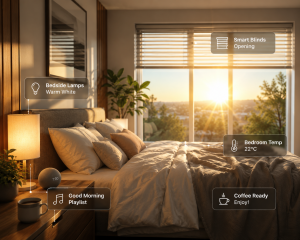
A morning automation might include:
- Bedroom lights gradually turn on.
- Smart blinds open.
- The thermostat adjusts.
- A smart speaker provides useful information.
Of course, you don’t need every device. Even one or two automated actions can improve your morning.
Leaving Home
When everyone leaves the house, an automation could:
- Turn off selected lights.
- Switch off connected appliances.
- Adjust the thermostat.
- Activate selected security routines.
As a result, you can reduce repetitive tasks and avoid forgetting simple things.
Nighttime Routine
At bedtime, a routine might:
- Turn off downstairs lights.
- Dim bedroom lighting.
- Check or lock compatible doors.
- Leave a hallway light at low brightness.
For families, routines like this can make the evening more predictable and convenient.
Common Smart Home Mistakes to Avoid
Buying Too Many Devices Too Quickly
You don’t need dozens of gadgets to create a useful smart home.
Instead, start small and focus on devices that solve real problems.
A few reliable products are generally more useful than a collection of gadgets you rarely use.
Ignoring Compatibility
A product can have excellent reviews and still be a poor fit for your setup.
For this reason, check ecosystem and protocol compatibility before purchasing.
Choosing Features Over Reliability
A simple device that works consistently is often better than a feature-packed product that disconnects regularly.
In other words, reliability should come before flashy features.
Forgetting About Privacy
Cameras, microphones, smart locks, and sensors deserve extra attention.
Therefore, use strong passwords, enable available security protections, and keep your devices updated.
Depending Entirely on the Internet
Some smart-home products lose certain functions when the internet connection fails.
Whenever possible, understand which features work locally and which depend on cloud services. That way, you know what to expect during an internet outage.
Smart Home Devices for Beginners: Where to Start
Building a smart home doesn’t have to be expensive.
To begin, consider this simple starter setup:
| Device | Why It’s Useful |
| Smart Plug | Automates ordinary appliances |
| Smart Bulb | Controls brightness and schedules |
| Motion Sensor | Triggers lights and routines |
| Smart Speaker | Provides voice control |
| Door/Window Sensor | Monitors entry points |
Rather than buying everything immediately, choose one category and use it for a few weeks.
After that, decide what additional device would genuinely improve your routine.
Ultimately, this gradual approach is more practical than buying gadgets simply because they are popular.
Frequently Asked Questions
What are smart home devices used for?
Smart home devices are used to automate, monitor, and remotely control household functions such as lighting, security, temperature, appliances, and access. As a result, they can make everyday tasks more convenient.
Are smart home devices worth it?
Yes, they can be worth the investment when they solve a real problem. For example, a smart plug may be valuable if you frequently forget to turn appliances off.
What is the easiest smart home device for beginners?
A smart plug or smart bulb is usually an excellent starting point. Because both are easy to install, you can quickly see how automation works without making a large investment.
Do smart home devices need Wi-Fi?
Not always. Some use Bluetooth, Zigbee, Thread, or other technologies. However, many popular products rely on Wi-Fi for remote access and cloud-based features.
Are smart home devices secure?
Security depends on the product, manufacturer, software, account settings, and user practices. Therefore, use strong passwords, enable two-factor authentication, install updates, and choose reputable products.
Can smart home devices save electricity?
Some devices can help reduce unnecessary energy use through schedules, automation, and monitoring. However, actual savings depend on the device and how it is used.
Do I need a smart home hub?
Not necessarily. Many products connect directly through Wi-Fi. On the other hand, advanced setups may benefit from a dedicated hub or compatible automation platform.
What should I look for when buying smart home devices?
Focus on compatibility, reliability, privacy, security, ease of installation, automation support, app quality, and subscription costs. Most importantly, choose products that solve a genuine household need.
Conclusion: Build a Smarter Home One Step at a Time
The best smart home devices aren’t always the most expensive or advanced products.
Instead, they are the ones that make your daily life easier.
A smart plug can prevent a lamp from staying on all night. A motion sensor can automatically illuminate a hallway. A security camera can help you monitor your property remotely. A smart lock can simplify access for family members and trusted guests.
Ultimately, those small improvements are what make smart home technology genuinely useful.
You don’t have to automate everything at once. Start with one real problem, choose a reliable solution, and expand gradually. Along the way, check compatibility, protect your accounts, and pay attention to ongoing costs.
Ready to make your home smarter? Start with one smart home device that solves an everyday problem, and build your system from there.