
I’ve always believed that a thermostat should do more than just sit on the wall and look important. It should actually make my life easier and maybe even save me a few bucks on energy bills. That’s why I decided to try the Google Nest Thermostat, a device that promises intelligence, convenience, and a little futuristic flair.
If you’re wondering what makes this smart thermostat special, or whether it’s worth installing in your home, stick around. I’ll share what I’ve learned after using it, setting it up, and occasionally talking to it (yes, I talk to my thermostat).
Here’s what I’ll cover:
- What makes the Google Nest Thermostat stand out
- How it compares to the Nest Learning Thermostat
- My experience with setting up and Nest Thermostat wiring
- Integration with Google WiFi and other smart devices
- Energy-saving features that actually work
- Pros, cons, and final thoughts

What Is the Google Nest Thermostat?
The Google Nest Thermostat is a smart temperature control device designed to make your home more efficient and comfortable. Unlike traditional thermostats, it uses motion sensors, WiFi connectivity, and machine learning to understand your preferences. Over time, it builds a custom schedule that automatically adjusts temperatures when you’re home, asleep, or away.
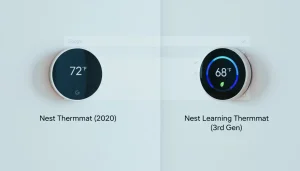
It comes in two primary models: the Nest Learning Thermostat and the Nest Thermostat (2020) version. While both serve the same purpose, the Learning Smart Thermostat offers more automation and compatibility options. The newer Nest Thermostat, however, provides an affordable and eco-friendly alternative for homeowners looking to enter the smart home ecosystem without breaking the bank.
Key Highlights:
- Sleek, modern design that fits any home interior.
- Motion detection to know when someone is home
- Energy-saving features certified by Energy Star.
- Voice and app control through Google Assistant or Alexa.
- Compatibility with most HVAC systems.
In essence, it’s more than a simple temperature controller; it’s an intelligent assistant for your home climate.
Nest Thermostat vs. Nest Learning Thermostat
Although visually similar, the two models differ significantly in functionality:
| Feature | Nest Thermostat | Nest Learning Thermostat |
| Auto-scheduling | Limited | Full learning |
| Sensors | Built-in motion | Motion + optional temperature sensors |
| Display | Touch slider | Metal dial with dynamic display |
| Price | $130 approx | $280 approx |
| HVAC Compatibility | Most systems | Broadest compatibility, including humidifiers |
I personally appreciate the manual control offered by the standard Nest Thermostat. While automation is useful, I like to adjust settings myself, particularly during unusual weather patterns.
How the Google Nest Thermostat Works
At its core, the Nest Thermostat functions through sensors, WiFi, and artificial intelligence. It detects when you’re home or away, automatically adjusting the temperature to maintain comfort while minimizing energy use.
Here’s a simplified overview of how it operates:
- Sensors: Monitor motion, humidity, and temperature changes.
- WiFi connectivity: Allows remote control via the Google Home app or integration with Google WiFi.
- Machine learning: Learns your preferred settings and creates personalized temperature schedules.
- Energy reports: Provide insights into your usage patterns and opportunities to save.
The device communicates with your heating and cooling system using your existing wiring setup. Once installed, it can be managed from anywhere—whether you’re at work, traveling, or relaxing at home.
Nest Thermostat Wiring: A Step-by-Step Overview
Installing a Nest Thermostat isn’t as complicated as it may sound. However, understanding the Nest thermostat wiring process is essential for a safe and efficient setup.

Step 1: Turn Off Power
Before you touch anything, switch off the power to your HVAC system from the circuit breaker. This prevents electrical hazards.
Step 2: Remove the Old Thermostat
Carefully detach your old thermostat faceplate and take a photo of the wiring. This will help you remember which wire connects to each terminal.
Step 3: Identify the Wires
Typical thermostat wiring includes terminals labeled R, Y, W, G, and C.
- R (Red) – Power
- Y (Yellow) – Cooling
- W (White) – Heating
- G (Green) – Fan
- C (Blue) – Common wire (for continuous power)
If your system lacks a C-wire, the Nest Thermostat can often operate without it, though performance may vary depending on your HVAC unit.
Step 4: Connect Wires to the Nest Base
Follow the in-app instructions from the Google Home app. Insert each wire into its matching terminal. The Nest baseplate makes this step simple with spring-loaded connectors.
Step 5: Attach the Display and Power On
Once wiring is secure, mount the display, restore power, and follow the on-screen setup. The system will run a self-check and guide you through connecting to WiFi.
For homeowners uncomfortable with wiring, hiring a certified technician is a safe option. Proper wiring ensures stable operation and avoids short circuits or misread temperature data.
Connecting the Nest Thermostat to Google WiFi
Connectivity is what truly unlocks the smart potential of this device. Pairing it with Google WiFi enables remote control and real-time monitoring through the Google Home app.
With Google WiFi integration, you can:
- Adjust the temperature from your smartphone, even while away.
- Receive alerts about system issues or unusual energy spikes.
- Share device access with family members.
- Sync other smart devices like Google Home Mini or smart plugs for automated routines.
- Voice control with Google Assistant or Alexa

For example, you could set a bedtime routine where lights dim, the fan slows down, and your Nest adjusts the room temperature—all triggered by one voice command.
Design and Display: Small Device, Big Personality
The design is minimalist — clean, round, and modern. The Nest Learning Thermostat uses a dial made of metal, while the basic model has a mirrored glass finish with a touch slider.
I prefer the Learning Thermostat’s display because it lights up when I walk by. It’s called Dynamic Farsight, and it shows helpful info like the time, weather, and current temperature. It’s a tiny feature, but it makes the thermostat feel alive — almost like it’s saying, “Hey, I see you.”
Temperature Sensors: Smarter Comfort for Every Room
One feature I love is the Nest Temperature Sensor. You can place these small sensors in different rooms to even out temperature differences across your home.

For instance, my living room warms up faster than my bedroom. By linking sensors to the thermostat, I can make sure my bedroom stays cozy at night while the living room chills (literally).
Each thermostat supports up to 18 sensors, which sounds excessive — unless you live in a mansion. In that case, congratulations, and please send your HVAC guy my way.
Occupancy Sensing: Smart and a Little Spooky
Both Nest models use radar-based motion sensors and your phone’s location to determine if you’re home. If you leave, it automatically activates Eco Mode to save energy.
In my experience, this feature worked well — though there were moments when I was home but sitting still, and the thermostat thought I’d left. Nothing like being motionless at your desk and realizing your house has decided you’re gone.
The Nest system can also communicate with other Google devices, such as smart displays or smoke detectors, to improve accuracy. That’s smart home teamwork in action.
Eco Mode and Energy Savings
Eco Mode is one of my favorite features. When I’m out, it adjusts the temperature to save energy. When I return, it quickly brings the temperature back to a comfortable level.
If you have the Learning Thermostat, it takes things further by factoring in outdoor weather conditions through Adaptive Eco Mode. I tested this during a particularly hot week, and it kept the house surprisingly comfortable without the AC going full blast.

The difference showed up on my energy bill, too. I didn’t expect huge savings, but I noticed around a 10% drop compared to my old programmable thermostat. That’s enough to cover my weekend coffee budget.
Smart Features That Set It Apart
The Nest Thermostat offers an array of intelligent features that elevate it above traditional temperature controllers.
- Eco Mode:
Automatically lowers energy consumption when you’re not home. - Scheduling and Learning:
Learns your patterns within a week and starts adjusting settings automatically. - Energy History:
Tracks usage and provides detailed reports to optimize savings. - Voice Control:
Compatible with Google Assistant and Alexa for hands-free management. - Smart Alerts:
Notifies you about system irregularities, temperature drops, or power failures.
These features not only make daily living easier but also promote sustainability by helping users cut down on unnecessary energy usage.
Energy Efficiency and Environmental Impact
Using a smart thermostat like Nest can reduce annual energy costs by 10–15% on average. In my case, I noticed a tangible difference within the first three months of use.
Beyond savings, this also contributes to sustainability. By reducing unnecessary heating or cooling, you decrease your household’s carbon footprint. Features like Eco Mode and adaptive scheduling ensure the system runs efficiently, minimizing wasted energy even when your schedule varies.
Real-World Performance: My Experience
After weeks of testing, I observed the following:
- Easy installation – The Google Home app simplifies wiring and setup.
- Reliable automation – Adaptive Eco Mode kept the home comfortable without manual adjustments.
- Motion sensing accuracy – Works well, though minor lapses occur when occupants remain still.
- Integration – Connected smoothly with Google WiFi, voice commands, and other smart devices.
Overall, the device delivered consistent performance, intuitive controls, and measurable energy savings.
Nest Thermostat vs. Traditional Thermostats
Traditional thermostats rely on manual adjustments and fixed temperature settings. Smart thermostats like Nest, on the other hand, bring intelligence into energy management.
| Feature | Traditional Thermostat | <strong>Google Nest Thermostat |
| Control | Manual | App + Voice + Auto |
| Energy Savings | Limited | Up to 15% annually |
| Scheduling | Manual | Learns habits |
| Connectivity | None | WiFi-based |
| Reports | None | Detailed insights |
The difference becomes evident in convenience and savings. While older thermostats focus on maintaining static temperatures, the Nest adapts dynamically, optimizing comfort and energy efficiency without constant user input.
Tips to Maximize Efficiency
To get the most from your Nest Thermostat:
- Position sensors wisely – Avoid direct sunlight or vents for accurate readings.
- Use scheduling – Even minor adjustments can save energy.
- Pair with smart plugs – Automate routines and control devices together.
- Monitor energy reports – Identify usage spikes and adjust accordingly.
- Update firmware – Keep features current and improve performance.
Troubleshooting Common Issues

Even smart devices need attention. Common problems include:
- WiFi connectivity issues – Restart router or verify network compatibility
- Battery or power problems – Check wiring, C-wire, or use the Nest Power Connector
- Temperature inaccuracies – Calibrate sensors via the app
- Display errors – Restart or reset if necessary
Proactive maintenance ensures reliability and longevity.
Integrating with Other Smart Home Devices
The Nest Thermostat is part of the broader Google ecosystem but is also Matter-compatible, meaning it works with:
- Amazon Alexa
- Apple HomeKit
- Samsung SmartThings
- Smart lights, plugs, and sensors

Integration allows for seamless routines: for instance, when leaving home, lights turn off, doors lock, and the thermostat enters Eco Mode — all automated.
Pros and Cons
Pros:
- Sleek, modern design
- Easy installation and user-friendly app
- Works with most HVAC systems
- Energy-saving and eco-friendly
- Integration with smart devices and Google WiFi
Cons:
- Learning features may not suit all users
- A motion sensor can misread occupancy in some cases
- Some older HVAC systems may require additional hardware
Is the Google Nest Thermostat Worth It?
If your goal is comfort, convenience, and energy savings, the Nest Thermostat is a solid investment. It provides both short-term benefits (remote control, intelligent scheduling) and long-term savings through reduced energy use.
The choice between the standard and the Learning model depends on how much automation you want versus hands-on control. Either way, the Nest Thermostat integrates easily into a modern smart home ecosystem.
Final Thoughts
After using and testing the device extensively, I can confidently recommend the Nest Thermostat. It combines technology, energy efficiency, and user-friendly design in a package that delivers both comfort and value.
Whether upgrading from a conventional thermostat or building a connected smart home, the Nest Thermostat meets the demands of modern living while helping reduce energy consumption and costs.
FAQs
Q1: Can the Nest Thermostat operate without WiFi?
Yes, but smart features like remote access and adaptive learning will be unavailable.
Q2: How much can I save on energy bills?
Users typically save 10–15% annually, depending on home size and usage.
Q3: Is professional installation necessary?
No, but Nest Thermostat wiring can be tricky for older systems; professional help is recommended if unsure.
Q4: Can it work with Google WiFi?
Yes, it integrates seamlessly with Google WiFi for remote control and automation.
Q5: How long is the warranty?
Standard warranty is one year, with options to extend through select retailers.