
I’ve been experimenting with smart home automation ideas for over a year now, and honestly, they’ve saved me from countless small, everyday annoyances. From forgetting to switch off the lights to leaving the thermostat running while I’m out, automations quietly take care of the things I used to forget.
What started as a fun weekend project quickly turned into something genuinely useful. My lights, thermostat, and even my coffee maker now work together like they’re on a team — and most days, they do a better job than I do before my first cup of coffee.
My goal here is simple: to share what I’ve learned so you can make your home smarter too — without turning it into a tech headache.
If you are completely new to the concept, check out this helpful guide on the best smart home devices that will give you an overview of where to begin.
Here is what you will find in this guide:
• What smart home automation actually means
• The real benefits I have noticed
• A quick smart home guide for beginners
• How to make your home a smart home, step by step
• My take on Google Home Mini and Google Home
• A simple look at the Google Home manual
I will keep this straightforward. No complicated jargon, just practical ideas, clear steps, and a few small jokes to keep things from sounding like a tech manual.
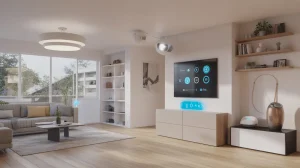
What Is Smart Home Automation? A Beginner’s Guide
For me, smart home automation is like having a personal assistant who never takes a coffee break. It is the system that enables your devices to communicate with each other, respond to your schedule, and operate quietly in the background.
Think about lights that switch on at sunset, thermostats that adjust before you walk in, or blinds that close when the sun gets too bright. These are not futuristic gimmicks anymore. They are real, accessible tools you can set up today, and some of the best smart home automation ideas start with simple upgrades like these.
The idea is simple: save time, energy, and sometimes even money, while making life at home more comfortable. It is not about having the flashiest gadgets or the most expensive tech, it is about creating a system that works for you.
Smart home automation is not just for tech enthusiasts. With affordable devices, user-friendly apps, and voice-controlled assistants like Google Home, anyone can try out smart home automation ideas that fit their daily routines and make their home smarter, one step at a time.
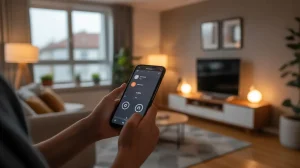
Benefits of Smart Home Automation
So, why bother making your home smart? Here is what I have experienced first-hand:
- Convenience
I do not need to walk into a dark house anymore. My lights know when I am home before my cat does. Motion sensors can trigger hallway lights when you get up at night, and smart plugs can power on your coffee maker before your alarm even rings. - Energy Savings
Leaving lights or devices running used to eat into my bills. Automations quietly fix that without me thinking about it. Smart thermostats learn your schedule and adjust temperatures automatically, while smart plugs cut off devices that are not in use. Over time, these small changes can make a noticeable difference in energy bills. - Security
A motion-activated light or smart lock is not just cool, it makes you feel safer when you are away. Cameras, door sensors, and automated alerts give you peace of mind whether you are at work or on vacation. - Comfort
Adjusting the thermostat with your voice while you are still wrapped in a blanket is one of those small joys people do not talk about enough. You can set your favorite lighting, temperature, and even music for different times of the day. It helps create a home environment that matches your mood and fits smoothly into your daily routine. - Accessibility
For anyone with mobility issues, voice control and automations can remove daily struggles. Smart devices let you control your home from anywhere with your phone or voice commands, making independent living easier and more enjoyable.
The short version is that a smart home means less work and more comfort. Your home becomes responsive, adaptive, and more human-friendly.
Smart Home Guide: Start Your Automation Journey
When someone asks me where to start with smart home automation, I usually say do not overthink it. It is not about wiring your entire house overnight or spending thousands of dollars. It is about taking one simple step that makes life easier.
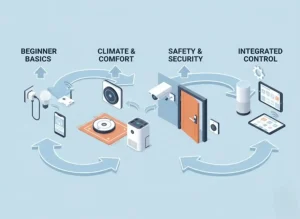
- Pick Your Hub
Think of your hub as the brain of your smart home. It is the central point that connects all your devices and helps them talk to each other. Without a hub, you would be stuck controlling every gadget through separate apps.
Devices such as Google Home, Amazon Echo, and Apple Home Pod are great starting points. Each comes with its own ecosystem, so it depends on what devices you already own or plan to buy.
Before you decide, think about the kind of control you want. Do you prefer voice commands, app control, or automation routines that run in the background? Your hub will set the tone for how smart your home feels.
- Start Small
You do not need to turn your house into a tech lab on day one. I always recommend starting with something simple, like a smart light bulb or a smart plug. These small upgrades show instant results. You will see how convenient it is to turn off your lights from your phone or schedule them to switch on before you get home.
It is also a great way to test your hub’s compatibility and understand how automation works. Once you have that wow moment, you will naturally want to explore more.
- Think About Routines
Smart home automation shines when it handles your repetitive daily tasks.
Ask yourself: what do I do every day that could run on its own? Turning off lights when I leave? Adjusting the thermostat before bed? Opening the blinds in the morning?
You can create routines like “Good Morning” or “Movie Time,” where multiple devices work together. Imagine your lights dimming, your TV turning on, and your curtains closing, all with one command.
- Expand Slowly
Here is the golden rule: do not rush it. Once you are comfortable, that is the time to grow. Add smart security cameras, automated blinds, or even a robotic vacuum. Each new device adds convenience, but too many too fast can make things confusing.
Focus on your biggest pain points. Maybe you forget to lock the door, or you hate getting up to adjust the thermostat. Start there.
Over time, you will notice how these devices quietly blend into your routine. For some inspiration, you can check out must-have smart home devices for every room.
How to Make Your Home a Smart Home Step by Step
I didn’t overhaul my home in one weekend. I built it step by step, focusing on small, high-impact improvements. Here’s a roadmap to get started:
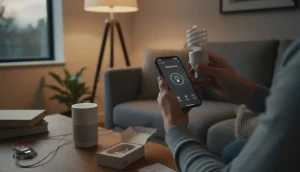
- Start with lighting
A smart bulb is cheap, fun, and shows you what’s possible. You can set schedules, adjust brightness, and even change colors to suit your mood or time of day. - Add a smart plug
Suddenly, your old lamp or coffee machine becomes part of your setup. Smart plugs are a versatile and inexpensive way to bring everyday appliances into your automation ecosystem. - Look at heating or cooling
A smart thermostat can cut costs and keep things comfortable. Many thermostats learn your schedule, so they heat or cool only when necessary. Some can even adjust based on the weather forecast or detect when you’re home. - Upgrade your security
Doorbell cameras, smart locks, and motion sensors provide peace of mind. Automated alerts let you monitor your home from anywhere, while timed routines can make it look like someone is home even when you’re away.
My rule: Don’t buy everything at once. Pick what solves the biggest annoyance in your day. That way, you’ll see real value from the start. Automation should simplify life, not complicate it.
Google Home Mini and Google Home: Which to Choose?
Google makes two popular smart speakers that often confuse beginners. Both look like friendly gadgets ready to answer questions, but here’s how they differ:
Google Home Mini
- Small, round, and designed to fit anywhere — bedside tables, desks, or even tucked on a bookshelf.
- Affordable, which makes it a great entry point if you’re just starting out.
- Best for voice commands, playing music, and controlling a few smart devices.
Google Home
- Larger, with better sound quality.
- Works better in bigger rooms where you want louder music or more reliable voice pickup.
- Still budget-friendly compared to some other hubs.
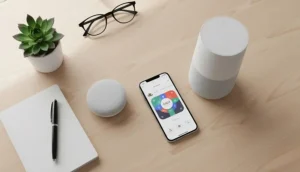
Both connect to the Google Home app and give you access to the same assistant. The real difference comes down to how you’ll use it. If you just want to try out voice control or run basic automations, the Mini is perfect. If music is important or you want a device that doubles as a centerpiece, go with the regular Google Home.
I personally started with a Mini because I didn’t want to spend much at the beginning. It handled lights, plugs, and reminders just fine. Later, I added a bigger speaker when I realized I also wanted it to double as a decent music system.
The good news? Both play nicely with most smart home devices — so you won’t get locked out of future upgrades.
Google Home Manual: Easy Setup and Tips
When people hear “manual,” they often picture a thick booklet that’s half warnings and half confusing diagrams. Luckily, setting up Google Home devices is far simpler than it sounds. Here’s the short version of what you need to know.
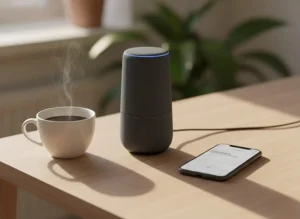
- Setting Up Google Home
- Plug in your device and wait for it to power on.
- Download the Google Home app on your phone (Android or iOS).
- The app automatically detects your device and walks you through setup.
- Connect it to your Wi-Fi network, sign in with your Google account, and you’re done.
- Connecting Devices
- Open the app and tap the “+ Add device” option.
- Choose the type of device (light, plug, thermostat, speaker, etc.).
- Follow the prompts — most devices connect in under two minutes.
- Group devices into rooms so you can control them together (like “Living Room Lights”).
- Using Voice Commands
Once set up, your Google Home responds to simple commands like:
- “Hey Google, turn on the living room lights.”
- “Hey Google, play my chill playlist on Spotify.”
- “Hey Google, what’s the weather tomorrow?”
Over time, you’ll discover routines that make life easier:
- “Good morning” → lights turn on, thermostat adjusts, and news starts playing.
- “Good night.” → lights go off, doors lock, and alarms set.
- Troubleshooting Basics
Even the best devices hiccup sometimes. Here are quick fixes:
- Device not responding? Restart it by unplugging and plugging back in.
- Wi-Fi issues? Check if your router is working and reconnect through the app.
- Voice not recognized? Retrain the “Voice Match” feature in the app.
Nine times out of ten, the issue is Wi-Fi. If your internet is solid, your Google Home will usually behave.
Practical Automation Ideas to Try Today
Here are some small, high-impact automations you can set up in minutes:
- Morning Routine
- Lights gradually brighten at sunrise.
- The coffee maker turns on automatically.
- The thermostat warms the house just before you wake.
- Evening Routine
- Lights dim after sunset.
- Blinds close automatically.
- “Good night” command turns off devices and locks doors.
- Away Mode
- Lights randomly turn on/off to simulate presence.
- Door sensors send alerts for unexpected activity.
- The thermostat adjusts to save energy.
- Voice-Controlled Fun
- “Movie time” dims lights, closes blinds, and powers on the TV.
- “I’m home” sets lights, thermostat, and music to your preferences.
- Energy Monitoring
- Track electricity use through smart plugs.
- Set reminders or automations to reduce standby power consumption.
Small routines like these compound over time, making life smoother without requiring constant attention.
Frequently Asked Questions (FAQ)
1. Is a Home Assistant security system hard to set up?
Not really — but it’s not plug-and-play either. You’ll need a bit of patience and curiosity. If you can follow guides, connect a few sensors, and tinker with settings, you’ll be fine. Once it’s up and running, you’ll wonder why you ever paid monthly for the same peace of mind.
2. Can I connect my existing sensors or cameras?
Yes. Most modern sensors and IP cameras that support Wi-Fi, Zigbee, or Z-Wave can integrate with Home Assistant. I’ve reused a bunch of my old gear instead of buying new stuff — that’s one of the biggest perks of going DIY.
3. What happens if my internet goes down?
Nothing dramatic. Home Assistant runs locally, which means it keeps working even if the internet disappears for a while. Your automations, sensors, and alarms all stay active. You just won’t get remote notifications until the connection’s back.
4. Can I still get professional monitoring like ADT offers?
Yes, you can. Home Assistant integrates with partners like Noon light, which lets you add professional monitoring whenever you want — no long-term contracts. I personally prefer self-monitoring, but it’s nice having the option.
5. How much does it really cost to build a Home Assistant system?
It depends on how fancy you want to go. My full setup — hub, sensors, cameras, and alarm — cost around $300–$400 total. Compare that to ADT’s $50 monthly fee, and you’ll see why I’m smiling.
6. Can I use motion sensors and lights together?
Absolutely. That’s one of my favorite automations. My hallway lights turn on dimly when motion’s detected at night — no blinding wake-up moments, just a smooth glow to guide the way. You can trigger almost anything: lights, cameras, sirens, or even thermostat changes.
7. Is it worth the effort to go DIY instead of buying a ready-made system?
If you like control, customization, and avoiding monthly bills — yes, it’s worth it. You’ll spend some time setting it up, but what you get in return is flexibility, privacy, and a setup that works exactly how you want.
8. Can I expand my system later?
Definitely. That’s the beauty of Home Assistant. Add more sensors, cameras, or automations anytime. Your system grows with you — no need to start over or upgrade plans
Motivating Conclusion: Start Small, Dream Big
The beauty of smart home automation is that it grows with you. You don’t need to invest hundreds of dollars upfront or understand every technical detail. Start small — a smart bulb, a plug, or a Google Home Mini — and gradually expand as you see the benefits.
Each new automation is a small win: a lit room when you arrive home, a thermostat that saves money, or a security alert that gives you peace of mind. Over time, these small improvements transform your home into a responsive, intelligent environment that works for you, not the other way around.
Remember: technology should simplify your life, not complicate it. Focus on solving everyday annoyances, and the “wow” moments will naturally follow. Your smart home isn’t about showing off gadgets — it’s about making life smoother, safer, and more enjoyable.
So, pick one small automation today. Make your morning easier, your evenings more relaxing, or your home more secure. Each step is progress, and before long, you’ll wonder how you ever lived without a home that thinks — and acts — a little bit smarter.
Start small, think big, and enjoy the magic of a home that works with you.