
How Do Smart Plugs Work? Smart plugs are one of the easiest and most affordable ways to make everyday appliances smarter. Instead of replacing your existing devices with expensive smart versions, a smart plug allows you to add remote control and automation features to items you already own. Whether it’s a table lamp, coffee maker, fan, or holiday lights, these devices can be managed from your smartphone or through voice commands.
While smart plugs are simple to install, many people wonder what actually happens behind the scenes when they tap a button in an app or ask a voice assistant to turn something on. Understanding how smart plugs work can help you choose the right model, troubleshoot common issues, and get the most value from your smart home setup.
This comprehensive guide explains how smart plugs function, their key features, common problems, expert recommendations, and practical tips for everyday use. A smart plug transforms everyday appliances into connected devices, allowing remote control, scheduling, voice commands, and energy monitoring through a smartphone app.
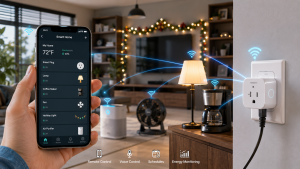
Why Understanding Smart Plugs Matters
Smart plugs may seem like simple accessories, but they play an important role in home automation. Knowing how they operate helps you use them more effectively and safely. It also allows you to take advantage of advanced features such as scheduling, energy monitoring, and automation routines that can improve convenience while reducing unnecessary power consumption.
How Do Smart Plugs Work Key Benefits of Smart Plugs:
Remote Control: Turn connected devices on or off from virtually anywhere using your smartphone.
Home Automation: Create schedules and routines that operate automatically throughout the day.
Energy Savings: Reduce wasted electricity by controlling when devices receive power.
Convenience: Manage appliances without physically touching switches or outlets.
Voice Assistant Integration: Control devices hands-free using simple voice commands.
Step-by-Step Guide: How Do Smart Plugs Work?
1. Smart Plugs Connect to a Wall Outlet
The process starts by plugging the smart plug into a standard electrical outlet. Once connected, the device receives power and activates its internal electronics. Unlike traditional timers or power strips, smart plugs contain small computer chips that allow them to communicate with other devices and receive commands remotely.
Think of a smart plug as a middleman between your wall outlet and the appliance you want to control. Instead of electricity flowing directly from the outlet to the appliance, the smart plug sits in between and determines when power should be supplied.
This design allows ordinary household devices to gain smart functionality without requiring modifications or professional installation.
2. The Plug Connects to Your Home Network
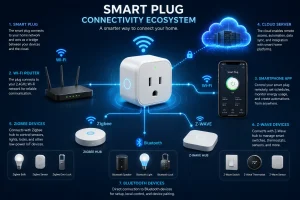
For a smart plug to receive commands, it needs a way to communicate with your phone or smart home system. Most smart plugs achieve this by connecting to your home network.
Common connection methods include:
Wi-Fi
Wi-Fi smart plugs connect directly to your router and are among the most popular options because they do not require additional equipment. Once connected, they can be controlled from almost anywhere with internet access.
Zigbee
Zigbee smart plugs communicate through a compatible smart home hub. These devices often consume less power and can create strong mesh networks in larger homes.
Z-Wave
Z-Wave technology works similarly to Zigbee and is commonly used in advanced home automation systems. It offers reliable communication and excellent device compatibility.
Bluetooth
Some smart plugs use Bluetooth for local control. These models are easy to set up but typically offer more limited remote access features.
Expert Advice: Before purchasing a smart plug, make sure it supports the wireless technology and smart home platform you plan to use.
3. Pairing With a Smartphone App
After connecting to the network, users install the manufacturer’s mobile application and complete the pairing process. This step links the smart plug to a personal account and enables remote management.
The app acts as the main control center, allowing users to monitor and manage connected devices from a single location. Depending on the model, the app may provide access to advanced settings, automation options, energy reports, and firmware updates.
Most applications allow users to:
- Turn devices on or off remotely
- Create schedules and timers
- Monitor power usage
- Group multiple devices together
- Receive notifications and alerts
- Update software automatically
Pro Tip: Assign clear names to your smart plugs, such as “Bedroom Lamp” or “Coffee Maker,” to make them easier to manage through apps and voice assistants.
4. Internal Relays Control the Flow of Electricity
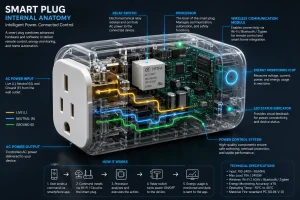
The most important component inside a smart plug is a relay. A relay functions like an electronic switch that controls whether electricity reaches the connected appliance.
When you press the power button in the app, a signal is sent to the smart plug. The relay then closes and allows electricity to flow through the device. When you turn the appliance off remotely, the relay opens and interrupts the electrical connection.
This process happens almost instantly and is the reason smart plugs can control devices without requiring physical interaction.
Expert Insight: Modern relays are designed to handle thousands of switching cycles while maintaining reliable performance.
5. Cloud Services Enable Remote Access
Many smart plugs rely on cloud technology to provide remote control features. When you send a command from your smartphone, the request often travels through a cloud server before reaching the smart plug.
A typical communication process looks like this:
- You open the mobile app.
- A command is sent through the internet.
- The cloud server processes the request.
- The command is forwarded to the smart plug.
- The smart plug activates or deactivates the relay.
- The connected appliance responds.
This entire sequence usually takes only a few seconds and allows users to manage devices even when they are miles away from home.
Pro Tip: Some advanced models support local control, which allows certain functions to continue working even if internet service is temporarily unavailable.
6. Scheduling and Automation Features
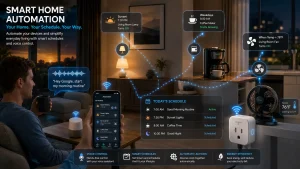
One of the biggest advantages of smart plugs is automation. Instead of manually turning devices on and off every day, users can create schedules that operate automatically.
For example, a lamp can turn on before sunset, a coffee maker can start brewing before you wake up, or holiday decorations can switch off late at night. These schedules improve convenience while helping reduce unnecessary energy consumption.
Many smart home platforms also support automation rules that connect smart plugs with sensors, cameras, and other devices. This creates a more intelligent and responsive home environment.
Expert Advice: Start with simple schedules before experimenting with more advanced automation routines.
7. Voice Control Through Smart Assistants
Many smart plugs integrate seamlessly with voice assistants, allowing hands-free operation of connected devices.
After linking your smart plug account, you can issue commands such as:
- Turn on the living room lamp
- Switch off the fan
- Turn off all bedroom devices
- Start the coffee maker
Voice control is especially useful when your hands are occupied or when you want quick access to devices across different rooms.
Safety Tip: Use clear and unique device names to avoid confusion when issuing voice commands.
8. Energy Monitoring and Usage Tracking
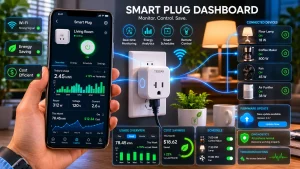
Some smart plugs include built-in energy monitoring features that provide detailed information about electricity consumption.
These models can track:
- Real-time power usage
- Daily energy consumption
- Monthly electricity patterns
- Estimated operating costs
By reviewing this information, users can identify devices that consume large amounts of electricity and make adjustments to improve efficiency.
For households looking to reduce energy bills, this feature can provide valuable insights into everyday power usage habits.
Pro Tip: Monitoring devices such as heaters, gaming consoles, and entertainment systems often reveals opportunities for energy savings.
Troubleshooting Common Smart Plug Problems
1. Smart Plug Won’t Connect to Wi-Fi
Cause: One of the most common setup issues is a failed Wi-Fi connection. This can happen because of a weak signal, incorrect network credentials, router settings, or compatibility issues. Many smart plugs only support 2.4 GHz Wi-Fi networks, so attempting to connect them to a 5 GHz network may prevent successful pairing.
Solution: Start by moving the smart plug closer to your router during setup. Double-check that you’re entering the correct Wi-Fi password and confirm that your network meets the device’s requirements. If the problem continues, restart both the router and the smart plug before attempting the setup process again. In many cases, a simple reset resolves connection issues.
2. Connected Device Doesn’t Turn On
Cause: If the smart plug appears to be working but the connected appliance doesn’t respond, the issue may be with the appliance rather than the plug itself. Some devices require manual activation after power is restored, while others enter a standby mode and won’t automatically restart when electricity becomes available.
Solution: Test the appliance by plugging it directly into a wall outlet to verify it functions properly. Make sure the appliance’s power switch is left in the “on” position before connecting it to the smart plug. Devices with physical power switches tend to work best because they can immediately resume operation when power is supplied.
3. Delayed Responses
Cause: Slow response times can occur when your Wi-Fi network is overloaded or experiencing poor signal strength. If the smart plug relies on cloud-based communication, internet speed and server response times can also affect performance.
Solution: Check your network connection and ensure the smart plug is receiving a strong Wi-Fi signal. If possible, move the router to a more central location or use a Wi-Fi extender in larger homes. Restarting your router and updating the smart plug’s firmware can also improve responsiveness and overall reliability.
4. Voice Commands Stop Working
Cause: Smart plugs that are connected to voice assistants may occasionally stop responding due to account synchronization issues, software updates, or changes within the smart home ecosystem. Incorrect device names can also cause voice assistants to misunderstand commands.
Solution: Open your voice assistant app and verify that the smart plug is still connected and properly linked. If necessary, remove the device and add it again. Using simple and unique names such as “Bedroom Lamp” or “Desk Fan” can improve voice recognition accuracy and reduce command errors.
5. Smart Plug Appears Offline
Cause: A smart plug may show as offline after a power outage, router restart, internet interruption, or network configuration change. When this happens, the plug loses communication with the app and cannot receive commands.
Solution: Unplug the smart plug for a few seconds and reconnect it to power. Check that your internet connection is working properly and verify that the router settings haven’t changed. If the device remains offline, perform a factory reset and reconnect it through the manufacturer’s app.
Pro Tip: Regularly updating your smart plug’s firmware helps prevent many common issues, improves security, and ensures compatibility with the latest smart home features.
Smart Plug Tips for Better Performance
Choose the Right Power Rating
Before connecting any appliance, take a moment to check the smart plug’s maximum wattage and electrical rating. While most smart plugs can handle common household devices such as lamps, fans, and coffee makers, some high-power appliances may exceed their limits. Overloading a smart plug can lead to poor performance, overheating, or even permanent damage. Always review the manufacturer’s specifications and ensure the connected device falls within the recommended operating range.
Maintain Reliable Wi-Fi Coverage
A strong and stable network connection plays a major role in how well your smart plug performs. Weak Wi-Fi signals can cause delayed responses, failed commands, or devices appearing offline in the app. If your smart plug is located far from the router, consider repositioning your router or using a Wi-Fi extender to improve coverage. Consistent connectivity helps ensure that automation schedules and remote commands work as expected.
Create Device Groups
If you use multiple smart plugs throughout your home, grouping them together can make daily management much easier. Most smart home apps allow you to organize devices by room or function, enabling you to control several appliances with a single command. For example, you can create a “Living Room” group that controls lamps, decorative lighting, and entertainment devices at the same time. This not only saves time but also creates a more streamlined smart home experience.
Monitor Energy Usage
Many smart plugs include energy monitoring features that provide insights into how much electricity connected devices consume. Reviewing these reports regularly can help identify appliances that use more power than expected. Understanding your energy habits allows you to make smarter decisions about when devices should operate and where you can reduce unnecessary consumption. Over time, even small adjustments can contribute to noticeable savings on electricity costs.
Install Firmware Updates
Manufacturers frequently release firmware updates to improve device stability, enhance security, and add new features. Ignoring these updates may lead to performance issues or compatibility problems with smart home platforms and voice assistants. Checking for updates periodically ensures your smart plug continues to operate efficiently and benefits from the latest improvements provided by the manufacturer.
Expert Advice & Safety Recommendations
Avoid Overloading Smart Plugs
Every smart plug has a maximum electrical rating that determines how much power it can safely handle. Connecting appliances that exceed this limit can affect performance, create overheating risks, and shorten the lifespan of the device. Before using a smart plug with heaters, air conditioners, or other high-power equipment, always review the manufacturer’s specifications and ensure the appliance falls within the recommended limits. Taking a few moments to verify compatibility can help prevent unnecessary safety concerns.
Purchase Trusted Brands
Not all smart plugs offer the same level of reliability, security, and long-term support. Reputable manufacturers typically perform extensive testing and provide regular firmware updates to improve performance and protect against potential vulnerabilities. Choosing a well-reviewed product from a trusted brand may cost slightly more upfront, but it often results in better reliability, stronger app support, and a longer product lifespan.
Secure Your Home Network
Smart plugs rely on your home network to communicate with apps and smart home platforms. Because of this, network security should not be overlooked. Use strong passwords for your Wi-Fi network, enable available security features on your router, and keep networking equipment updated with the latest firmware. These simple precautions help reduce the risk of unauthorized access and protect your connected devices.
Inspect Devices Periodically
Although smart plugs are designed for everyday use, it’s a good idea to inspect them occasionally for signs of wear or damage. Check for unusual heat, discoloration, strange odors, loose connections, or visible cracks in the housing. Identifying problems early can help prevent larger issues and ensure the device continues operating safely and efficiently over time.
Follow Manufacturer Guidelines
Each smart plug model may include specific recommendations regarding installation, setup, operation, and maintenance. Following these guidelines helps ensure optimal performance and may also be necessary to maintain warranty coverage. If you’re unsure about a particular feature or limitation, consult the user manual or the manufacturer’s support resources before making changes to your setup.
Expert Advice: Smart plugs deliver the best experience when integrated into a broader smart home system that includes automation, scheduling, and energy management features.
Conclusion
Smart plugs work by combining wireless communication, intelligent switching technology, and automation features to control electrical devices remotely. They act as a bridge between your appliances and your home network, allowing you to manage power through apps, schedules, and voice commands.
By understanding how smart plugs operate, you can use them more effectively, improve convenience, reduce unnecessary energy consumption, and build a smarter, more connected home. Whether you’re just beginning your smart home journey or expanding an existing setup, smart plugs remain one of the most practical and versatile devices available today.
FAQs:
How Do Smart Plugs Work?
1. Do smart plugs need Wi-Fi to work?
Most smart plugs use Wi-Fi for remote access and automation features. However, some models operate through Zigbee, Z-Wave, or Bluetooth connections and may require a compatible hub.
2. Can smart plugs reduce electricity usage?
Yes. Smart plugs help eliminate unnecessary power consumption by allowing users to schedule devices, monitor energy use, and turn appliances off remotely when not needed.
3. Are smart plugs safe for everyday use?
When used correctly and within their rated electrical limits, smart plugs are generally safe for daily operation. Always follow manufacturer guidelines for installation and usage.
4. Can smart plugs work with voice assistants?
Yes. Many models support voice assistants, allowing users to control connected devices using simple spoken commands.
5. What appliances can be used with smart plugs?
Common examples include lamps, fans, coffee makers, holiday lights, air purifiers, and other appliances that automatically resume operation when power is supplied.
6. Do smart plugs work during internet outages?
Some models lose remote functionality when internet service is unavailable, while others offer local control features that continue operating within the home network.
7. Can smart plugs be used outdoors?
Only outdoor-rated models should be used outside. These devices are specifically designed to handle weather exposure and environmental conditions.
8. How many smart plugs can I install in one home?
Most smart home systems support dozens of connected devices. The exact number depends on your network capacity and smart home platform.
9. Do smart plugs consume electricity themselves?
Yes, but the amount is typically very small. In most cases, the energy savings created through scheduling and automation outweigh the power consumed by the smart plug.
10. Are smart plugs worth buying?
For many homeowners, smart plugs provide an affordable and effective way to automate devices, improve convenience, manage energy consumption, and enhance smart home functionality.