
A smart plug is one of the simplest and most affordable devices used in modern home automation. It allows ordinary electrical appliances to become part of a connected ecosystem without requiring expensive upgrades or replacements. By plugging into a standard wall outlet, this small device acts as an intelligent intermediary between the power source and the appliance connected to it. Once linked to a wireless network and controlled through a smartphone application or voice assistant, users can remotely manage power delivery, create schedules, monitor energy usage, and automate everyday tasks.
As smart home technology becomes increasingly popular, more homeowners are discovering the convenience and efficiency that connected devices provide. Smart plugs are often considered the ideal starting point because they are easy to install, require minimal technical knowledge, and work with a wide range of household appliances. Whether you want to turn on a lamp before arriving home, automate your morning coffee routine, reduce unnecessary electricity consumption, or improve home security while traveling, a smart plug can provide a practical solution.
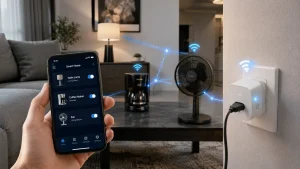
This comprehensive guide explains everything you need to know about smart plugs, including how they work, their benefits, setup process, common applications, troubleshooting methods, expert recommendations, and practical tips to help you maximize their value. A smart plug allows you to control household devices such as lamps, coffee makers, and fans remotely using a smartphone app and Wi-Fi connection.
Why Smart Plugs Matter
Smart home technology is no longer limited to luxury homes or technology enthusiasts. Today, homeowners are increasingly looking for ways to improve convenience, reduce energy waste, and simplify daily routines. A smart plug provides many of these advantages without requiring extensive renovations or costly equipment purchases.
Unlike traditional outlets that simply provide continuous electrical power, a smart outlet can intelligently control when electricity flows to a connected appliance. This allows users to automate devices based on schedules, environmental conditions, occupancy, or personal preferences.
Beyond convenience, these devices can contribute to energy efficiency. Many household appliances continue consuming electricity even when not actively in use, a phenomenon commonly known as standby power or phantom load. By automatically disconnecting power when devices are unnecessary, smart plugs can help reduce electricity consumption over time.
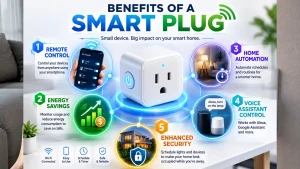
Discover how a smart plug improves convenience, reduces energy consumption, enables automation, supports voice assistants, and enhances home security. For many households, the combination of convenience, automation, security, and energy management makes smart plugs one of the most useful additions to a connected home ecosystem.
Key Benefits of Using a Smart Plug
Convenient Remote Control
One of the primary advantages is the ability to control appliances from virtually anywhere. Through a mobile application, users can turn devices on or off whether they are in another room, at work, or traveling abroad.
Home Automation
Automation allows appliances to operate according to predefined schedules. Lights can switch on at sunset, fans can activate during warmer periods, and coffee machines can start before you wake up.
Reduced Energy Waste
Many models include energy-monitoring capabilities that help users understand how much electricity specific appliances consume. This visibility often leads to better energy management decisions.
Voice Assistant Compatibility
Many smart plugs integrate seamlessly with voice-control platforms, allowing users to manage devices through spoken commands rather than physical switches.
Enhanced Home Security
When homeowners are away, scheduled lighting can create the appearance that someone is present, helping deter potential intruders.
Step-by-Step Guide to Setting Up a Smart Plug
1. Select an Appropriate Outlet
Before installation, choose a location that provides reliable Wi-Fi coverage. Weak signals can lead to connectivity issues and inconsistent performance.
Additionally, verify that the connected appliance falls within the plug’s electrical rating. Exceeding maximum power limits may create safety risks and damage equipment.
2. Insert the Smart Plug Into the Wall Socket
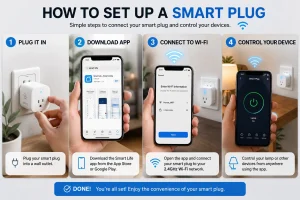
Connect the smart plug directly to a wall outlet. Most devices will illuminate an LED indicator showing that power is available and setup mode is active.
Some models automatically enter pairing mode when powered for the first time, while others require pressing a setup button.
3. Install the Manufacturer’s Mobile Application
Nearly all smart plugs use a companion application for configuration and management.
The application typically allows users to:
- Add new devices
- Create schedules
- Monitor electricity consumption
- Configure automation rules
- Receive status notifications
- Update firmware
Pro Tip: Download the official manufacturer app rather than third-party alternatives to ensure security and full functionality.
4. Connect the Device to Your Wireless Network
Most smart plugs use a 2.4 GHz Wi-Fi network because it provides better range than 5 GHz connections.
During setup:
- Open the application
- Select “Add Device”
- Follow the on-screen instructions
- Enter your Wi-Fi credentials
- Complete the pairing process
A successful connection usually takes less than five minutes.
5. Connect Your Appliance
After setup, plug the desired appliance into the smart plug.
Common examples include:
- Lamps
- Coffee makers
- Fans
- Humidifiers
- Air purifiers
- Decorative lighting
- Chargers
- Small kitchen appliances
6. Create Automated Schedules
Scheduling is one of the most valuable features available.
Examples include:
- Turning lights on every evening
- Powering off entertainment systems overnight
- Running fans during specific hours
- Activating seasonal decorations automatically
Expert Advice: Start with simple schedules and gradually expand automation as you become familiar with the system.
7. Integrate With Voice Assistants
Many smart plugs support:
- Amazon Alexa
- Google Assistant
- Apple HomeKit
- Samsung SmartThings
Voice integration allows effortless control without needing to open a mobile application.
8. Test and Optimize Performance
After installation, verify that commands execute correctly and schedules function as expected.
Monitor performance for several days and adjust settings based on your household routine.
How Smart Plugs Work
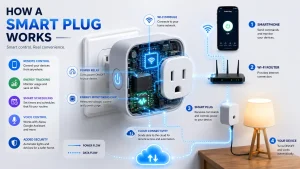
Understanding the technology behind smart plugs helps users maximize their effectiveness.
At their core, these devices contain a wireless communication module and an internal relay. The wireless module connects to your home’s network, while the relay physically controls electrical power flowing to the connected appliance.
When a command is sent through an application or voice assistant, the relay either completes or interrupts the electrical circuit.
This process occurs almost instantly and allows appliances to be controlled remotely.
More advanced models may also include:
- Energy monitoring sensors
- Power usage reporting
- Automation engines
- Matter compatibility
- Temperature protection systems
- Surge protection mechanisms
The result is a highly flexible device capable of transforming ordinary electronics into connected smart home components.
Troubleshooting Common Problems
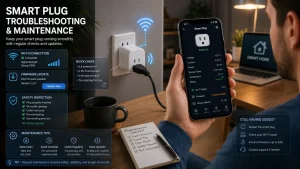
1. Smart Plug Won’t Connect to Wi-Fi
One of the most common issues users encounter is difficulty connecting a smart plug to a wireless network during the initial setup process. This problem can occur for several reasons, including weak signal strength, incorrect Wi-Fi credentials, router compatibility issues, or attempting to connect to an unsupported network frequency. Most smart plugs are designed to work on 2.4 GHz networks, and many cannot connect to 5 GHz networks directly.
Cause: Weak signal strength or incompatible network settings.
Solution: Move closer to the router, verify network credentials, and ensure the wireless network supports 2.4 GHz connections.
Pro Tip: Restart both the smart plug and router before attempting the setup process again. This often resolves temporary connection issues.
2. Device Frequently Disconnects
Intermittent disconnections can be frustrating because they prevent reliable automation and remote control. In many cases, the issue is caused by unstable Wi-Fi coverage, signal interference from nearby electronics, outdated firmware, or router congestion. Frequent disconnects may also occur in larger homes where the wireless signal struggles to reach certain rooms.
Cause: Unstable wireless coverage.
Solution: Improve router placement or consider a mesh networking system for stronger coverage throughout the home.
Expert Advice: Regular firmware updates can improve network stability and reduce communication errors between devices.
3. Appliance Doesn’t Turn On
Sometimes the smart plug appears to function normally, but the connected appliance does not respond. This usually happens because certain appliances require a physical power switch to remain in the ON position before they can be controlled remotely. If the appliance does not automatically resume operation when power is restored, the smart plug will not be able to activate it.
Cause: Some appliances require a physical power switch to remain in the ON position.
Solution: Verify the appliance can resume operation automatically when power is restored.
Pro Tip: Lamps, fans with mechanical switches, and coffee makers often work best with smart plugs because they can restart automatically when power is supplied.
4. Scheduling Is Not Working Properly
Automated schedules may occasionally fail to run at the expected time. This issue is commonly related to incorrect time zone settings, app synchronization problems, firmware bugs, or temporary internet interruptions. Even a small configuration error can cause scheduled actions to execute at the wrong time or not at all.
Cause: Incorrect time zone configuration.
Solution: Confirm the application’s regional settings and synchronize device time.
Expert Advice: Review daylight saving settings and ensure your mobile application is updated to the latest version.
5. Voice Commands Fail
Voice assistants provide convenient hands-free control, but they may occasionally stop responding to commands. This can happen when account permissions change, device names are duplicated, or communication between the smart plug and the voice platform becomes interrupted. Most voice-control issues can be resolved through account synchronization and device rediscovery.
Cause: Assistant integration problems or synchronization errors.
Solution: Re-link your voice assistant account and perform a new device discovery process.
Pro Tip: Use simple and unique device names such as “Bedroom Lamp” or “Desk Fan” to improve voice recognition accuracy.
Maintenance Tips for Long-Term Performance
Regularly Update Firmware
Manufacturers frequently release updates that improve security, stability, compatibility, and device performance. Firmware updates may also introduce new features, fix connection issues, and address vulnerabilities that could affect your smart home network. Checking for updates every few months helps ensure your device continues operating efficiently.
Avoid Overloading
Every smart plug has a maximum electrical rating that should never be exceeded. Connecting appliances that draw too much power can lead to overheating, reduced lifespan, or potential safety risks. Always review the manufacturer’s specifications before connecting heaters, large kitchen appliances, or other high-consumption equipment.
Check Connections Periodically
Over time, plugs and outlets can experience wear from regular use. Inspect the smart plug occasionally for loose connections, unusual warmth, discoloration, or visible damage. Identifying these issues early can prevent performance problems and improve safety.
Maintain Reliable Wi-Fi Coverage
A stable wireless connection is essential for remote control, scheduling, and automation features. If your smart plug frequently disconnects, consider moving your router, reducing interference, or using a mesh network to improve signal strength throughout the home.
Keep the Device Clean
Dust and debris can accumulate around outlets and electronic components. Periodically wipe the exterior with a dry microfiber cloth and ensure ventilation areas remain unobstructed. Avoid using water or cleaning solutions directly on the device.
Expert Advice & Safety Recommendations
- Use Certified Products
- Purchase devices that meet recognized safety standards and certifications.
- Avoid High-Power Equipment
- Large heaters, industrial machinery, and heavy-duty appliances may exceed supported power ratings.
- Enable Security Features
- Use strong passwords and activate two-factor authentication whenever possible.
- Monitor Energy Usage
- Regularly review consumption data to identify opportunities for efficiency improvements.
- Follow Manufacturer Instructions
- Each model may have specific operating guidelines and safety recommendations.
Conclusion
A smart plug is a simple yet highly effective device that brings automation, convenience, energy management, and remote control capabilities to everyday appliances. By acting as a bridge between traditional electronics and modern smart home platforms, it allows users to upgrade existing devices without replacing them.
Whether your goal is reducing electricity consumption, automating daily routines, improving security, or simply making life more convenient, a smart plug offers one of the easiest and most cost-effective ways to begin building a connected home.
A properly configured smart plug can help streamline household operations, improve efficiency, and provide greater control over how and when your appliances consume electricity.
FAQs:
Smart Plug Guide
1. What is a smart plug?
A smart plug is a device that connects to a wall outlet and allows users to control connected appliances remotely through a smartphone app, voice assistant, or automation platform.
2. How does a smart plug work?
It uses wireless connectivity and an internal relay to control electrical power supplied to a connected appliance.
3. Do smart plugs save electricity?
Yes. They can reduce unnecessary energy consumption by automatically turning devices off when they are not needed.
4. Can smart plugs work without Wi-Fi?
Some models offer Bluetooth connectivity, but most require a wireless internet connection for full remote functionality.
5. Are smart plugs safe?
When used within their rated electrical capacity and according to manufacturer instructions, they are generally considered safe.
6. Can I control a smart plug while away from home?
Yes. Most models support remote access through cloud-connected mobile applications.
7. What appliances can be connected?
Lamps, fans, coffee makers, air purifiers, holiday lights, chargers, and many small household electronics.
8. Do smart plugs work with Alexa and Google Assistant?
Many models are compatible with major voice assistants and support hands-free operation.
9. Why does my smart plug keep disconnecting?
Common causes include weak Wi-Fi signals, outdated firmware, router issues, or interference from nearby electronics.
10. How long do smart plugs typically last?
Quality smart plugs can often operate reliably for many years when used within their specified power ratings and maintained properly.