How Do Smart Bulbs Work? Everything You Need to Know

How do smart bulbs work? It’s a common question among homeowners who are exploring smart lighting for the first time. Smart lighting has transformed the way people interact with their homes. Instead of relying solely on traditional wall switches, homeowners can now control lights using smartphones, voice assistants, schedules, and automated routines. While these features may seem complex, the technology behind them is surprisingly straightforward.

The answer lies in a combination of LED lighting, built-in wireless communication, and smart software. Unlike conventional light bulbs, smart bulbs contain electronic components that allow them to communicate with your home network or compatible smart home platform. This enables remote control, automation, voice commands, and customised lighting scenes.

Most smart bulbs fit into standard light sockets, making them easy to install without changing your home’s electrical wiring. Once connected, they become part of your smart home ecosystem and can work alongside compatible smart switches, sensors, plugs, and other connected devices.

In this guide, you’ll learn how smart bulbs connect to your home, the technology inside them, how different wireless connections operate, how voice control functions, and how smart bulbs communicate with other smart home devices.
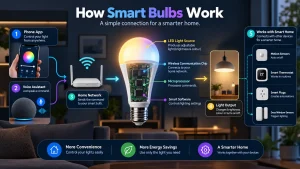
Table of Contents

  • How Do Smart Bulbs Work?
  • What Is Inside a Smart Bulb?
  • How Smart Bulbs Connect to Your Home
  • Wi-Fi Smart Bulbs
  • Bluetooth Smart Bulbs
  • Zigbee Smart Bulbs
  • Thread and Matter Smart Bulbs
  • How Smart Bulbs Communicate with Apps
  • How Voice Control Works
  • How Smart Bulbs Use Automation
  • Do Smart Bulbs Need the Internet?
  • What Happens When Power Is Turned Off?
  • Advantages of Smart Bulb Technology
  • Frequently Asked Questions
  • Final Thoughts

How Do Smart Bulbs Work?

At first glance, a smart bulb looks almost identical to a standard LED light bulb. The difference is found inside the bulb, where additional electronic components allow it to communicate with other devices.

A smart bulb combines three main technologies:

  • LED lighting
  • A wireless communication chip
  • An internal microprocessor

The LED provides efficient illumination, while the wireless chip enables communication using technologies such as Wi-Fi, Bluetooth, Zigbee, Thread, or Matter. The microprocessor acts as the bulb’s small computer, processing commands received from your smartphone, smart home hub, or voice assistant.

When you tap a button in a mobile app or speak a voice command, that instruction travels through your home network to the smart bulb. The bulb instantly processes the command and performs the requested action, such as switching on, dimming, changing colour, or activating a lighting scene.

Unlike traditional bulbs that only respond to electricity from a wall switch, smart bulbs remain connected whenever power is available, allowing them to respond to remote commands at any time.

What Is Inside a Smart Bulb?
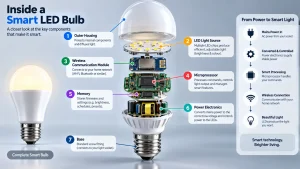
Although they resemble ordinary LED bulbs, smart bulbs contain several electronic components that work together.

LED Light Source

Every smart bulb uses LED technology to produce light efficiently while generating less heat than many older lighting technologies.

Wireless Communication Module

This small radio chip enables the bulb to communicate with smartphones, routers, hubs, or other smart home devices.

Microprocessor

The internal processor interprets incoming commands and controls the bulb’s brightness, colour temperature, colour changes, and automation settings.

Memory

The bulb stores network information, schedules, firmware updates, and user settings even after being switched off through the mobile app.

Firmware

Firmware is the software permanently installed inside the bulb. Manufacturers periodically release firmware updates that improve performance, security, compatibility, and new features.

How Smart Bulbs Connect to Your Home

One of the most important parts of understanding how do smart bulbs work is knowing how they connect to your home’s network. Every smart bulb uses a wireless communication method that allows it to receive commands from your smartphone, voice assistant, or smart home platform.

The connection technology varies depending on the manufacturer and model. Some smart bulbs communicate directly with your Wi-Fi router, while others rely on Bluetooth or a dedicated smart home protocol such as Zigbee or Thread.

Regardless of the connection method, the goal is the same: to allow your smart bulb to receive instructions and respond almost instantly.

Choosing the right connection type depends on the size of your smart home, the number of connected devices, and whether you prefer a simple setup or a more advanced automation system.

Wi-Fi Smart Bulbs

Wi-Fi smart bulbs connect directly to your home’s wireless router without requiring an additional hub. Because of their straightforward installation, they are one of the most popular choices for first-time smart home users.

After installing the manufacturer’s app, you simply connect the bulb to your Wi-Fi network and begin controlling it through your smartphone.

Advantages of Wi-Fi Smart Bulbs

  • No separate smart hub required
  • Quick and simple installation
  • Remote access from almost anywhere
  • Supports voice assistants on many models
  • Suitable for most households

Things to Consider

If your home contains dozens of Wi-Fi smart devices, they may place additional demand on your wireless network. For larger smart homes, dedicated smart home protocols may provide better scalability.

Bluetooth Smart Bulbs

Bluetooth smart bulbs communicate directly with nearby smartphones or tablets without connecting to your home’s Wi-Fi network.

These bulbs are often used in apartments, bedrooms, offices, or other smaller spaces where remote internet access is not essential.

Because Bluetooth has a shorter communication range than Wi-Fi, control is generally limited to when you’re within range of the bulb.

Advantages of Bluetooth Smart Bulbs

  • Easy setup
  • No internet connection required for local control
  • Lower network traffic
  • Suitable for individual rooms

Limitations

Bluetooth bulbs usually don’t provide the same level of remote access or advanced automation as Wi-Fi or hub-based systems.

Zigbee Smart Bulbs

Zigbee is a wireless communication standard designed specifically for smart home devices.

Unlike Wi-Fi bulbs, Zigbee smart bulbs usually connect through a compatible smart hub. The hub communicates with multiple smart devices and manages automation throughout the home.

One of Zigbee’s biggest advantages is its mesh networking capability. Each compatible powered device can help relay signals to nearby devices, improving reliability across larger homes.

Advantages of Zigbee Smart Bulbs

  • Reliable communication
  • Excellent for larger smart homes
  • Supports many connected devices
  • Lower power consumption
  • Strong automation capabilities

Because of these benefits, Zigbee is widely used in homes with extensive smart lighting installations.

Thread and Matter Smart Bulbs

Newer smart bulbs increasingly support Thread and Matter, two technologies designed to improve compatibility between smart home devices.

What Is Thread?

Thread is a low-power wireless networking technology that creates a reliable mesh network between compatible smart devices.

Instead of depending on a single central device, Thread allows connected products to communicate efficiently with one another.

What Is Matter?

Matter is a universal smart home standard developed to improve compatibility across different brands.

Rather than locking users into a single ecosystem, Matter allows supported devices from different manufacturers to work together more easily.

As more manufacturers adopt Matter, homeowners will have greater flexibility when choosing smart home products.

How Smart Bulbs Communicate with Apps

Once connected to your network, the smart bulb continuously waits for incoming commands.

When you open the companion app and tap the power button, the app sends a command through your wireless network. The bulb immediately receives that instruction and performs the requested action.

The same communication process occurs when you:

  • Adjust brightness
  • Change colour temperature
  • Select a colour
  • Activate a lighting scene
  • Create schedules
  • Start automation routines

Most communication happens within seconds, making smart lighting feel almost instantaneous.

Manufacturers also use their mobile apps to deliver firmware updates, configure rooms, create groups, and manage multiple smart bulbs from a single interface.

How Voice Control Works

One of the most popular smart bulb features is voice control.

Instead of using a wall switch or smartphone, you simply speak a command to a compatible voice assistant.

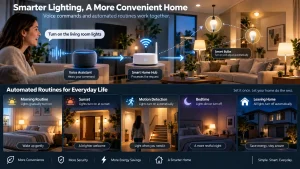
For example, you can ask your voice assistant to:

  • Turn on the living room lights
  • Dim the bedroom lights
  • Change the dining room lights to warm white
  • Turn off all lights before bedtime

Here’s what happens behind the scenes:

  1. Your voice assistant receives your spoken command.
  2. The command is processed by the smart home platform.
  3. The platform sends the instruction to the smart bulb.
  4. The bulb responds almost immediately.

Because everything happens within seconds, voice control provides a convenient hands-free way to manage lighting throughout your home.

How Smart Bulbs Use Automation

Automation is one of the biggest advantages of smart lighting.

Rather than manually controlling lights every day, smart bulbs can perform actions automatically based on schedules, routines, or triggers.

Common automation examples include:

  • Turning lights on at sunset
  • Switching lights off at bedtime
  • Gradually brightening lights in the morning
  • Activating lights when motion is detected
  • Changing lighting scenes for movie nights
  • Turning off all household lights when everyone leaves

Many smart home platforms also allow smart bulbs to interact with compatible sensors, smart plugs, thermostats, door locks, and security systems.

These automations make everyday lighting more convenient while reducing the need for manual control.

Do Smart Bulbs Need the Internet?

A common misconception is that every smart bulb requires an internet connection to function. In reality, the answer depends on the type of smart bulb and how you want to use it.

Many Wi-Fi smart bulbs use the internet to provide remote access, cloud-based automation, firmware updates, and voice assistant integration. However, basic local control may still work even if your internet connection is temporarily unavailable.

Bluetooth smart bulbs don’t require an internet connection for nearby control. As long as your smartphone is within Bluetooth range, you can usually turn the lights on or off, adjust brightness, and change settings.

Zigbee and Thread smart bulbs communicate through a compatible smart hub or border router. Even if your internet connection goes down, many local automations and routines continue working because they are processed within your home network.

The internet mainly becomes necessary when you want to:

  • Control lights while you’re away from home
  • Use cloud-based voice assistants
  • Receive firmware updates
  • Synchronise devices across multiple locations
  • Access advanced cloud automation features

For everyday lighting inside your home, many smart bulbs can continue operating even without an active internet connection.

What Happens When Power Is Turned Off?

One of the most important things to understand when learning how do smart bulbs work is how they behave when electrical power is removed.

Unlike traditional bulbs, smart bulbs need continuous power to stay connected to your smart home network.

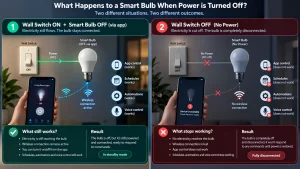
If you turn the bulb off using the mobile app or voice assistant, the bulb still receives electricity from the wall switch. It simply switches the LED light off while keeping the wireless electronics active.

This standby connection allows the bulb to:

  • Receive future commands
  • Follow schedules
  • Participate in automation routines
  • Respond instantly to voice assistants
  • Remain connected to your smart home platform

However, if someone turns the wall switch off, electricity is completely removed.

When this happens:

  • The bulb disconnects from the network.
  • Voice control no longer works.
  • Automation pauses.
  • Remote control becomes unavailable.
  • Scheduled lighting cannot run.

Once power is restored, most smart bulbs automatically reconnect to the network within a few moments.

This is why many smart home users leave wall switches permanently switched on and control their lighting through apps, voice assistants, or smart switches instead.

Advantages of Smart Bulb Technology

Understanding how do smart bulbs work also helps explain why they have become one of the most popular smart home devices.

Simple Installation

Most smart bulbs screw into existing light sockets without requiring additional wiring or electrical modifications.

Greater Convenience

You can control lighting from your smartphone, tablet, smartwatch, or compatible voice assistant without needing to walk to a wall switch.

Flexible Lighting

Many smart bulbs allow you to adjust brightness, colour temperature, and colours to create lighting that suits different activities and moods.

Automation

Smart bulbs can automatically follow schedules and routines, reducing the need to manually switch lights on and off every day.

Integration with Smart Homes

Modern smart bulbs work alongside compatible smart plugs, motion sensors, security systems, thermostats, and other connected devices to create a more intelligent home.

Energy Efficiency

Because smart bulbs use LED technology, they typically consume less electricity than many older lighting technologies while offering significantly more functionality.

Easy Expansion

As your smart home grows, additional bulbs can usually be added through the same app or smart home platform, allowing you to manage lighting throughout your entire home from one place.

Frequently Asked Questions

How do smart bulbs work without a hub?

Many smart bulbs connect directly to your home’s Wi-Fi network, allowing them to communicate with the manufacturer’s app without requiring a separate hub. Bluetooth models also work without a hub for nearby control.

Do all smart bulbs use Wi-Fi?

No. Smart bulbs may use Wi-Fi, Bluetooth, Zigbee, Thread, or other compatible wireless technologies depending on the manufacturer and model.

Can smart bulbs work with voice assistants?

Yes. Many smart bulbs support popular voice assistants, allowing you to control lighting using spoken commands after completing the setup process.

Do smart bulbs remember their settings?

Yes. Most smart bulbs save their configuration, schedules, and network information, allowing them to reconnect automatically after a temporary power interruption.

Can smart bulbs work together?

Yes. Most smart home platforms allow multiple smart bulbs to be grouped into rooms, zones, or lighting scenes so they operate together.

Are smart bulbs difficult to install?

No. Most smart bulbs install exactly like standard LED bulbs. After screwing the bulb into a compatible socket, you simply complete the setup using the manufacturer’s mobile app.

Final Thoughts

Now that you understand how do smart bulbs work, it’s easy to see why they have become a popular choice for modern homes. By combining LED lighting with wireless communication and smart software, these bulbs provide much more than simple illumination.

Whether they connect through Wi-Fi, Bluetooth, Zigbee, Thread, or Matter, smart bulbs are designed to receive commands, automate everyday lighting, and integrate with compatible smart home systems. From adjusting brightness and changing colours to following schedules and responding to voice commands, they make lighting more flexible and convenient.

If you’re just getting started with smart lighting, understanding how smart bulbs communicate and operate will help you choose the right products for your home. For a broader overview of smart lighting, be sure to read our pillar guide, What Is a Smart Bulb?, where you’ll learn about smart bulb features, benefits, types, buying tips, and much more.

Leave a Comment