
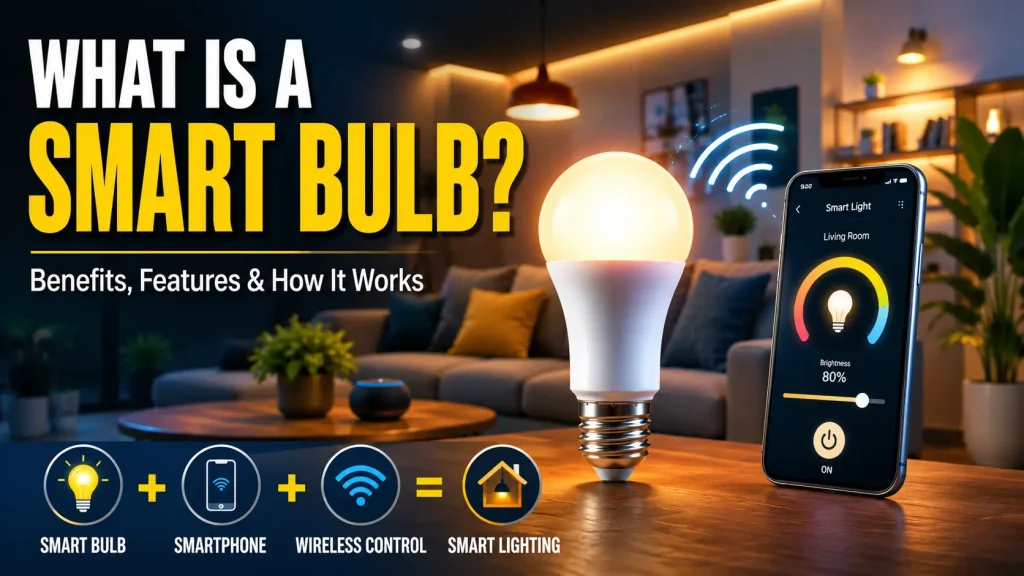
Lighting has come a long way from simple on-and-off switches. Today, homeowners can control their lights with a smartphone, automate daily lighting schedules, and even use voice commands without touching a switch. If you’ve ever wondered what is a smart bulb, it’s a connected LED light bulb that communicates with your home network or smart home platform, allowing you to control lighting remotely and automate how your lights operate.
Unlike traditional light bulbs, a smart bulb contains built-in wireless technology that enables communication with a mobile app, smart home hub, or voice assistant. This added functionality allows users to adjust brightness, change lighting colours on supported models, create schedules, and manage lighting from almost anywhere.
Smart bulbs are designed for both convenience and flexibility. Whether you want lights to switch on automatically when you arrive home, create a relaxing atmosphere in the evening, or control multiple rooms from a single app, smart bulbs provide far more control than conventional lighting.
One of the reasons smart bulbs have become so popular is their simple installation. In most cases, they fit into existing light sockets just like standard LED bulbs, making them one of the easiest smart home devices to install.
In this guide, you’ll learn what is a smart bulb, how it works, its main features, benefits, available types, common uses, installation process, compatibility, and the factors to consider before buying one. You’ll also find answers to common questions and brief introductions to related smart bulb topics that are covered in more detail in dedicated guides.
Table of Contents
- What Is a Smart Bulb?
- How Does a Smart Bulb Work?
- What Is a Smart Bulb? Key Features
- What Is a Smart Bulb? Benefits
- What Is a Smart Bulb? Types Explained
- What Is a Smart Bulb Used For?
- Is a Smart Bulb Worth Buying?
- What Is a Smart Bulb? Buying Guide
- Smart Bulb Compatibility
- How to Install a Smart Bulb
- Smart Bulb Security and Privacy
- Common Smart Bulb Problems
- How Do Smart Bulbs Work?
- How Do Smart Light Bulbs Work?
- Do Smart Bulbs Use More Electricity?
- Do Smart Bulbs Use Electricity When Off?
- How to Reset a Smart Bulb
- Frequently Asked Questions
- Final Thoughts
What Is a Smart Bulb?
A smart bulb is a connected LED light bulb that allows users to control lighting through a smartphone app, voice assistant, or compatible smart home platform. Instead of working only with a traditional wall switch, the bulb communicates wirelessly, giving users greater control over how and when their lights operate.
Most smart bulbs connect using Wi-Fi, Bluetooth, Zigbee, Thread, or Matter. Some models connect directly to your home network, while others require a compatible smart hub to communicate with other smart devices.
Unlike standard bulbs, smart bulbs can do much more than simply turn on and off. Many models allow you to adjust brightness, change colour temperature, display millions of colours, create lighting schedules, and automate routines that match your daily activities.
Because they fit many standard light sockets, smart bulbs are often one of the easiest upgrades for anyone starting a smart home. After installation and setup, they become part of your connected home, working alongside other compatible devices to provide greater convenience and control.
For many homeowners, a smart bulb is the first step toward building a fully connected smart home ecosystem.
How Does a Smart Bulb Work?
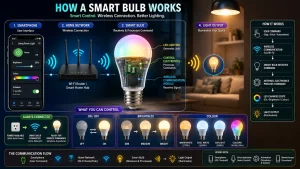
A smart bulb combines LED lighting with built-in wireless communication technology. After being installed in a light fixture, the bulb connects to your home’s wireless network or compatible smart home platform.
Once connected, it receives commands from a smartphone app, smart hub, or voice assistant. These commands tell the bulb when to turn on or off, adjust brightness, change colour temperature, display different colours, or activate customised lighting scenes.
Unlike conventional bulbs that only respond to electricity from a wall switch, smart bulbs remain connected whenever power is available. This allows them to respond instantly to remote commands and participate in automated routines.
Depending on the manufacturer, communication may occur through Wi-Fi, Bluetooth, Zigbee, Thread, or Matter. Each technology offers different advantages, but they all allow smart bulbs to communicate with other compatible smart home devices.
Later in this guide, we’ll explore how do smart bulbs work in greater detail, including the communication technologies and automation features that make smart lighting possible.
What Is a Smart Bulb? Key Features
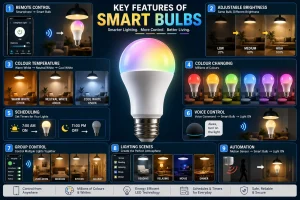
Smart bulbs include a range of features that go beyond traditional lighting. While available functions vary between models, most offer several capabilities designed to improve convenience and flexibility.
Remote Control
Control your lights from almost anywhere using a compatible mobile application.
Adjustable Brightness
Increase or decrease brightness without installing a separate dimmer switch.
Colour Temperature Adjustment
Switch between warm, neutral, and cool white lighting depending on the activity or time of day.
Colour-Changing Lighting
Many smart bulbs offer millions of colour options that can be customised through the companion app.
Scheduling
Create automatic schedules that switch lights on or off at selected times throughout the day.
Voice Control
Operate lighting using compatible voice assistants instead of manually using the wall switch.
Group Control
Organise multiple bulbs into rooms or zones so several lights can be controlled together.
Lighting Scenes
Save customised brightness and colour settings for activities such as reading, relaxing, dining, or watching movies.
Automation
Connect smart bulbs with other compatible smart devices to create automated routines based on schedules, sensors, or household activity.
Smart Bulb Compatibility
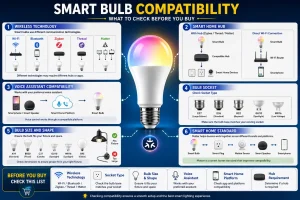
Before purchasing a smart bulb, it’s important to make sure it works with your existing smart home devices and lighting setup. Compatibility depends on the wireless technology used, the manufacturer’s ecosystem, and the smart home platform you plan to use.
Many smart bulbs connect directly to your home’s Wi-Fi network, making them simple to install without additional hardware. Others use Bluetooth, Zigbee, or Thread and may require a compatible smart home hub for full functionality.
If you already use a voice assistant, verify that the smart bulb supports your preferred platform. Most leading manufacturers provide compatibility with one or more popular smart home ecosystems, allowing you to control lights using voice commands or include them in automated routines.
It’s equally important to choose the correct bulb shape and socket type. Smart bulbs are available with different bases and brightness levels, so checking compatibility with your existing light fixtures helps ensure a straightforward installation.
If you’re planning to expand your smart home in the future, choosing bulbs that support newer standards such as Matter can provide greater flexibility when adding compatible devices from different manufacturers.
How to Install a Smart Bulb
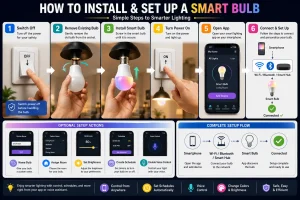
Installing a smart bulb is usually a quick process that requires only a few simple steps. Although setup varies slightly between brands, the overall procedure is very similar.
Step 1: Switch Off the Light Fixture
Turn off the light using the wall switch before removing the existing bulb. If the previous bulb has been in use, allow it to cool before handling it.
Step 2: Install the Smart Bulb
Insert the smart bulb into the appropriate light socket and ensure it is fitted securely.
Step 3: Turn the Power On
Switch the light fixture back on. Most smart bulbs automatically enter pairing mode when powered for the first time.
Step 4: Download the Manufacturer’s App
Install the official companion application on your smartphone or tablet. The app will guide you through the connection process.
Step 5: Connect the Bulb
Follow the instructions in the app to connect the bulb to your Wi-Fi network, Bluetooth connection, or compatible smart hub, depending on the model.
Step 6: Complete the Setup
After the connection is complete, assign the bulb to a room, give it a name, configure schedules, and adjust any additional settings available within the app.
Once setup is finished, the smart bulb is ready for remote control, automation, and voice commands.
Smart Bulb Security and Privacy
Like other connected smart home devices, smart bulbs communicate through wireless networks. While they typically collect less information than devices such as smart cameras or smart speakers, following good security practices helps keep your smart home protected.
Always install firmware updates provided by the manufacturer, as these often improve security, performance, and compatibility.
Use a strong password for your smart home account and enable multi-factor authentication if the service supports it. This adds an extra layer of protection against unauthorised access.
Download only the official companion app from trusted app stores, and avoid using unofficial software that may compromise device security.
If you have multiple connected devices, organising them within a secure home network can improve both reliability and overall smart home management.
Common Smart Bulb Problems
Smart bulbs are designed for reliable everyday use, but occasional issues can still occur. Fortunately, most problems can be resolved with a few basic troubleshooting steps.
Smart Bulb Won’t Connect
If the bulb doesn’t connect during setup, verify that you’re using the correct wireless network and that your smartphone is close enough to the bulb during pairing.
The Bulb Appears Offline
Sometimes the companion app may show the bulb as offline. Restarting the bulb, checking the network connection, or reopening the app often restores communication.
Voice Control Stops Working
If voice commands suddenly stop working, check that your smart home account is still linked correctly and that the bulb remains connected to your chosen smart home platform.
Schedules No Longer Run
Review your automation settings within the companion app to ensure schedules remain enabled after software updates or configuration changes.
The Bulb Becomes Unresponsive
If the smart bulb no longer responds to commands, restarting the light fixture or reconnecting the device may resolve the issue. If the problem continues, performing a factory reset is usually the next recommended step.
The following sections introduce several common smart bulb topics that deserve a more detailed explanation. Each topic has its own dedicated guide where you can learn more.
How Do Smart Bulbs Work?
Although we’ve already explained the basics, many people want a deeper understanding of how do smart bulbs work and how they communicate with other smart home devices.
Smart bulbs use built-in wireless technology to receive commands from your smartphone, smart home hub, or voice assistant. Once connected, they remain part of your smart home network, allowing them to respond instantly to remote commands, scheduled routines, and automation rules.
Depending on the model, communication takes place through Wi-Fi, Bluetooth, Zigbee, Thread, or Matter. These technologies allow smart bulbs to work individually or alongside other connected devices such as smart switches, motion sensors, and security systems.
Understanding how smart bulbs communicate makes it easier to choose the right model and build a reliable smart home ecosystem.
Read our complete guide: How Do Smart Bulbs Work
How Do Smart Light Bulbs Work?
The terms smart bulb and smart light bulb are often used interchangeably, but many users search for them separately.
A smart light bulb receives wireless commands and converts those instructions into lighting actions such as switching on, dimming, adjusting brightness, or changing colours. Unlike conventional bulbs, it remains connected to your smart home system whenever power is available.
This continuous communication allows smart light bulbs to support automation, scheduling, remote control, and integration with compatible smart home platforms.
Learn more in our guide: How Do Smart Light Bulbs Work
Do Smart Bulbs Use More Electricity?
Because smart bulbs contain wireless communication hardware, many homeowners wonder whether they consume more electricity than standard LED bulbs.
During normal operation, smart bulbs are generally energy efficient because they use LED technology. However, they also consume a very small amount of standby power so they can remain connected to your smart home network.
For most households, this standby consumption is minimal and has only a small effect on overall electricity usage.
Read the full article: Do Smart Bulbs Use More Electricity?
Do Smart Bulbs Use Electricity When Off?
Many first-time users are surprised to learn that a smart bulb may continue using a very small amount of electricity after being turned off through the mobile app.
This happens because the bulb remains connected to the network, allowing it to receive future commands, automation routines, and scheduled events. If power is completely disconnected at the wall switch, the bulb no longer consumes electricity until power is restored.
Learn more here: Do Smart Bulbs Use Electricity When Off?
How to Reset a Smart Bulb
If your smart bulb becomes unresponsive, won’t connect to Wi-Fi, or you’re preparing it for a new owner, performing a factory reset is often the best solution.
Resetting removes the saved network information and returns the bulb to its original factory settings. Afterward, the device can be paired again just like a new installation.
The exact reset method varies between manufacturers, so following the correct procedure is important.
See the complete guide: How to Reset a Smart Bulb
Frequently Asked Questions
What is a smart bulb?
A smart bulb is a connected LED light bulb that allows you to control lighting through a smartphone app, voice assistant, or compatible smart home platform. It offers features such as remote control, scheduling, automation, and adjustable lighting without requiring special wiring.
How does a smart bulb work?
A smart bulb uses built-in wireless technology to communicate with your home network or smart home system. After setup, it can receive commands from a mobile app or voice assistant to turn on, turn off, adjust brightness, or change lighting settings.
Do smart bulbs need Wi-Fi?
Not always. Some smart bulbs connect directly to Wi-Fi, while others use Bluetooth, Zigbee, Thread, or Matter. Depending on the model, a compatible smart hub may also be required.
Can I use a smart bulb with a normal light switch?
Yes. Smart bulbs fit into standard light fixtures and work with normal wall switches. However, the wall switch usually needs to remain on so the bulb stays connected and can receive remote commands.
Are smart bulbs energy efficient?
Most smart bulbs use LED technology, making them highly energy efficient. Although they consume a small amount of standby power while connected, they generally use much less electricity than older incandescent or halogen bulbs.
Can smart bulbs be controlled when I’m away from home?
Many Wi-Fi smart bulbs support remote access through the manufacturer’s mobile app. As long as the bulb and your smartphone have an internet connection, you can control your lights from almost anywhere.
Do smart bulbs work with voice assistants?
Yes. Many smart bulbs support popular voice assistants, allowing you to switch lights on or off, adjust brightness, change colours, and activate lighting scenes using voice commands.
Can multiple smart bulbs work together?
Yes. Most smart lighting apps allow users to group several bulbs into rooms or zones, making it possible to control multiple lights simultaneously with a single command or automation.
How long do smart bulbs last?
The lifespan varies by manufacturer, but most smart bulbs use LED technology and are designed to last for many years under normal household use.
Can a smart bulb be reset?
Yes. Nearly every smart bulb includes a factory reset procedure. The exact method varies by brand, but resetting usually removes saved settings and allows the bulb to be paired again as a new device.
Final Thoughts
Understanding what is a smart bulb is the first step toward creating a smarter and more convenient home. Unlike traditional light bulbs, smart bulbs combine energy-efficient LED lighting with wireless connectivity, giving you greater control over how, when, and where your lights operate.
Whether you’re looking for simple remote control, automated schedules, voice commands, or personalised lighting scenes, smart bulbs offer a practical upgrade that requires very little effort to install. They also serve as an excellent foundation for anyone beginning their smart home journey, with the flexibility to expand into a larger connected ecosystem over time.
As smart home technology continues to evolve, smart bulbs are becoming more compatible, reliable, and easier to use than ever before. Choosing the right model depends on your home’s lighting needs, preferred smart home platform, and the features that matter most to you.
If you’re ready to explore smart lighting further, the dedicated guides linked throughout this article provide more detailed information on how smart bulbs work, their energy usage, and troubleshooting techniques to help you get the most from your connected lighting system.