
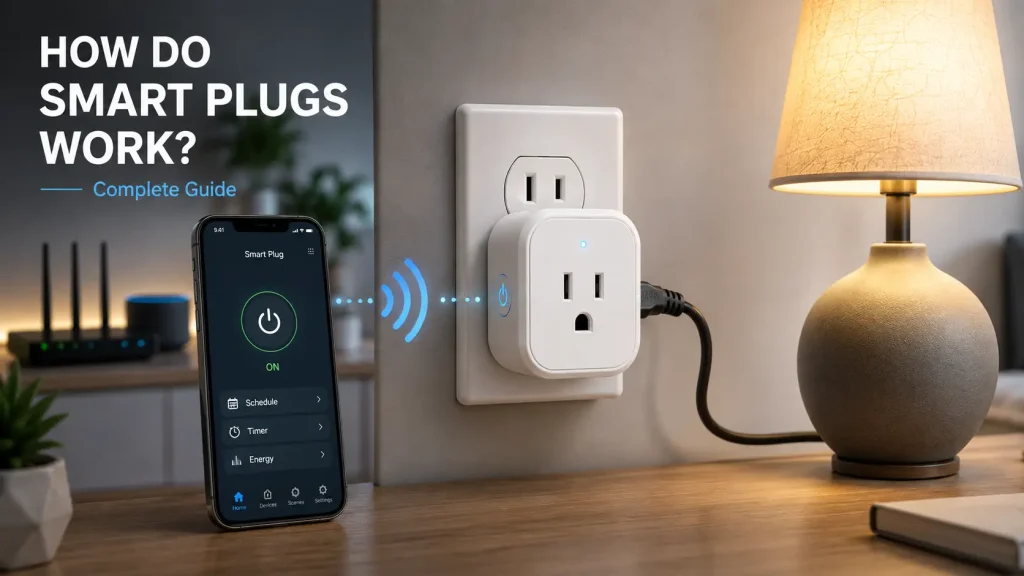
Smart plugs are one of the easiest ways to add automation to your home without replacing your existing appliances. If you’ve recently purchased one or are considering buying one, you may be asking how do smart plugs work and what actually happens when you control a device from your phone or with a voice command.
Although smart plugs appear simple from the outside, they rely on wireless communication and built-in electronics to control the flow of electricity safely and efficiently. Once connected to your home network, they allow compatible appliances to switch on or off remotely, follow schedules, respond to automation routines, and, in some cases, monitor electricity usage.
Whether you’re using a lamp, coffee maker, fan, or another everyday appliance, understanding how a smart plug operates will help you get the most from your smart home setup.
In this guide, you’ll learn how smart plugs communicate with your devices, how they connect to your home network, what role mobile apps and voice assistants play, and why they have become one of the most popular smart home products.
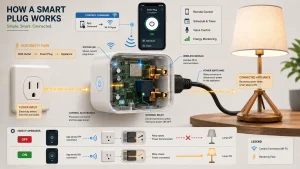
Table of Contents
- What Happens Inside a Smart Plug?
- How Smart Plugs Connect to Your Home Network
- How Mobile Apps Control Smart Plugs
- How Voice Assistants Work with Smart Plugs
- How Automation and Scheduling Work
- Do Smart Plugs Work Without the Internet?
- Technologies Used by Modern Smart Plugs
- Common Limitations
- Frequently Asked Questions
- Final Thoughts
What Happens Inside a Smart Plug?
At first glance, a smart plug looks like a simple electrical adapter, but inside it contains several electronic components that allow it to communicate with your home network and control the power supplied to a connected appliance.
When you plug a smart plug into a wall outlet, it receives electrical power just like any other device. Instead of sending that power directly to the appliance, the smart plug controls when electricity is allowed to flow through its internal switching mechanism.
Once configured using the manufacturer’s mobile application, the smart plug connects to your home network and waits for commands. Those commands may come from your smartphone, a voice assistant, or an automated schedule you’ve already created.
Whenever the plug receives an instruction, its internal relay changes state by either supplying electricity to the connected appliance or disconnecting it completely. This process happens almost instantly and is usually indicated by a small LED light on the device.
Although every manufacturer uses slightly different hardware, the basic operating principle remains similar across most smart plugs available today.
How Smart Plugs Connect to Your Home Network
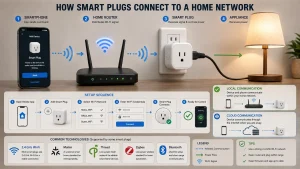
Most smart plugs communicate through a 2.4 GHz Wi-Fi network because it offers reliable coverage throughout the home while consuming relatively little power.
During the initial setup, you’ll usually install the manufacturer’s companion app on your smartphone. The app guides you through pairing the smart plug with your wireless network by entering your Wi-Fi credentials. Once connected successfully, the plug becomes part of your home network and is ready to receive commands.
Some modern smart plugs support additional communication technologies, including Matter, Thread, Zigbee, or Bluetooth. These standards improve compatibility with different smart home ecosystems and, in some cases, provide faster local communication without relying entirely on cloud services.
Regardless of the technology used, the overall goal remains the same: creating a secure connection that allows you to control compatible appliances more conveniently.
How Mobile Apps Control Smart Plugs
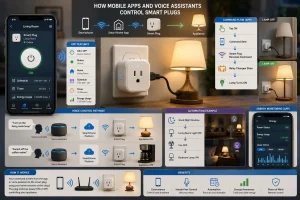
The companion mobile app acts as the control centre for your smart plug. It allows you to manage connected devices, create schedules, organise automation routines, and adjust settings from almost anywhere.
When you tap the power button inside the app, a command is sent either directly through your local network or through the manufacturer’s cloud service, depending on how the device operates. The smart plug receives that command and immediately changes the power state of the connected appliance.
Most apps also display useful information such as the current power status, device name, room location, firmware updates, and scheduling options. Models equipped with energy monitoring may also provide electricity usage statistics, helping you better understand how individual appliances consume power.
The mobile app also simplifies adding multiple smart plugs throughout your home, making it possible to organise devices by room or category for easier management.
How Voice Assistants Work with Smart Plugs
One of the biggest advantages of a smart plug is its ability to work with voice assistants. Instead of opening a mobile app, you can control compatible appliances by speaking simple commands through a smart speaker or mobile device.
Most smart plugs support popular platforms such as Amazon Alexa, Google Assistant, and, depending on the model, Apple HomeKit. After linking the smart plug to your preferred platform, the connected appliance appears alongside your other smart home devices.
For example, you can say:
- Turn on the living room lamp.
- Switch off the coffee maker.
- Turn on the bedroom fan.
The voice assistant processes your request and sends a command to the smart plug, which immediately changes the power supplied to the connected appliance.
You can also include smart plugs in larger automation routines. For instance, a single “Good Night” routine could turn off multiple lights, switch off a fan, and activate a bedside lamp simultaneously.
How Automation and Scheduling Work
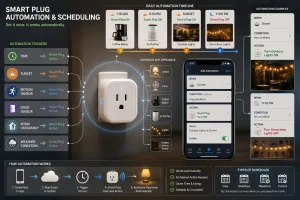
Automation is one of the main reasons many homeowners choose smart plugs. Instead of manually controlling appliances every day, you can create rules that operate automatically based on your routine.
Most companion apps allow you to create schedules by selecting specific times for an appliance to switch on or off. Once saved, these schedules continue running until you modify or remove them.
Some smart home platforms offer more advanced automation options. Depending on your setup, a smart plug can respond to:
- Time of day
- Sunrise or sunset
- Motion sensors
- Door sensors
- Room occupancy
- Weather conditions
- Other connected smart devices
For example, you could create routines that:
- Turn on outdoor lights before sunset.
- Start an air purifier every evening.
- Switch off decorative lighting at midnight.
- Power a fan during the warmest part of the afternoon.
Because these routines operate automatically, they help simplify everyday tasks without requiring constant manual control.
Do Smart Plugs Work Without the Internet?
This is one of the most common questions new users ask.
The answer depends on the type of smart plug and the technology it uses.
If your smart plug relies entirely on cloud services, remote control usually becomes unavailable when your internet connection goes offline. However, many devices continue following schedules that were already stored before the connection was interrupted.
Some newer smart plugs support local communication through standards such as Matter or Thread. These devices can often continue responding within your home network even if the internet is temporarily unavailable, provided the necessary smart home controller remains operational.
If electrical power is interrupted, the behaviour after power returns depends on the manufacturer’s settings. Some models restore their previous state automatically, while others remain switched off until a new command is received.
Understanding these differences can help you choose a smart plug that best matches your smart home requirements.
Technologies Used by Modern Smart Plugs
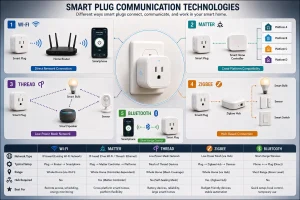
Although smart plugs all perform similar tasks, the communication technology inside them can differ significantly.
Wi-Fi
Wi-Fi remains the most common connection method. It allows direct communication between the smart plug, your home router, and the companion mobile app without requiring additional hardware.
Matter
Matter is a newer smart home standard designed to improve compatibility between devices from different manufacturers. A Matter-compatible smart plug can work across multiple smart home ecosystems, making future upgrades much easier.
Thread
Thread is a low-power wireless protocol that creates a reliable mesh network between compatible smart home devices. It offers faster local communication while reducing dependence on cloud-based services.
Zigbee
Some smart plugs use Zigbee instead of Wi-Fi. Zigbee devices usually require a compatible smart home hub but consume less power and can communicate efficiently with many connected devices throughout the home.
Bluetooth
Bluetooth smart plugs are generally intended for short-range control. They work well when your smartphone is nearby but usually offer fewer remote control features compared with Wi-Fi-enabled models.
Each technology has its own advantages, so the best choice depends on your existing smart home setup and future expansion plans.
Common Limitations
Although smart plugs are highly versatile, they are not suitable for every appliance or situation.
Here are a few important limitations to keep in mind.
Maximum Electrical Load
Every smart plug has a maximum supported electrical rating. Connecting appliances that exceed this limit may damage the plug or create safety risks.
Manual Switch Appliances
Some appliances require a physical button to be pressed after power is restored. These devices may not operate correctly with a smart plug because simply restoring electrical power is not enough to start them.
Network Dependence
Most smart plugs depend on a stable wireless connection for full functionality. Weak Wi-Fi coverage can lead to slower responses or occasional connectivity problems.
Outdoor Use
Unless specifically designed for outdoor environments, smart plugs should always be used indoors. Outdoor-rated models include additional protection against moisture, dust, and changing weather conditions.
Frequently Asked Questions
Can Smart Plugs Work Without Wi-Fi?
Most smart plugs require Wi-Fi for remote control and the initial setup process. However, some models continue following saved schedules even if the internet connection is temporarily unavailable. Devices that support Matter or Thread may also provide local control when paired with a compatible smart home hub.
Do Smart Plugs Use a Lot of Electricity?
No. Smart plugs consume only a small amount of electricity to maintain their network connection and internal electronics. Their standby power consumption is generally very low and is unlikely to have a noticeable impact on your electricity bill.
Can a Smart Plug Control Any Appliance?
Not every appliance is suitable for use with a smart plug. Devices should automatically resume operation when electrical power is restored and must remain within the plug’s maximum electrical rating. Always check the manufacturer’s specifications before connecting high-powered equipment.
Do Smart Plugs Need a Smart Home Hub?
Most Wi-Fi smart plugs connect directly to your wireless router and do not require a separate hub. However, some Zigbee or Thread devices may need a compatible smart home controller to unlock their full functionality.
Are Smart Plugs Difficult to Install?
No. Installation is usually straightforward and takes only a few minutes. Most manufacturers provide a companion mobile app that guides users through connecting the smart plug to their home network and completing the setup process.
Can Multiple Smart Plugs Be Controlled Together?
Yes. Most smart home platforms allow several smart plugs to be grouped into a single room or automation routine. This makes it possible to control multiple appliances at once using the mobile app or a single voice command.
Do Smart Plugs Improve Home Automation?
Yes. Smart plugs make automation much more accessible by allowing ordinary household appliances to become part of a connected smart home system. They can work alongside smart lighting, security devices, sensors, and voice assistants to create routines that operate automatically throughout the day.
Final Thoughts
Understanding how do smart plugs work helps you make better use of one of the most practical smart home devices available today. Although they appear simple on the outside, smart plugs combine wireless communication, intelligent switching, and automation features to give you convenient control over everyday appliances.
Whether you’re using a mobile app, creating schedules, or controlling devices with your voice, a smart plug provides an easy way to automate your home without replacing existing electrical equipment. By choosing a model that matches your home network, supports your preferred smart home platform, and meets your appliance requirements, you can build a more connected and efficient living space.
If you’re new to smart home technology, it’s also worth reading our What Is a Smart Plug? guide, which explains the basics, benefits, common uses, and safety considerations before you choose your first device.