
Smart home technology has transformed the way people interact with everyday household devices, and smart bulbs are among the most popular innovations in this growing industry. If you’re wondering what is a smart bulb, it is an intelligent lighting solution that allows users to control brightness, colors, schedules, and power settings through smartphones, voice assistants, or automation platforms.
Unlike traditional light bulbs that simply turn on and off using a wall switch, smart bulbs provide a much higher level of control and customization. They can be operated remotely, integrated with smart home systems, and programmed to respond automatically based on time, location, or specific events.
As connected homes become increasingly common, many homeowners are exploring smart lighting as an affordable entry point into home automation. Whether you want to improve convenience, reduce energy consumption, enhance home security, or create customized lighting environments, smart bulbs offer a practical and flexible solution.
This comprehensive guide explains what a smart bulb is, how it works, its benefits, energy consumption, common features, setup process, troubleshooting methods, and everything else you need to know before purchasing or using one.
What Is a Smart Bulb?
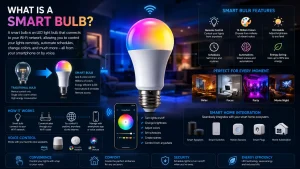
A smart bulb is a Wi-Fi, Bluetooth, Zigbee, Z-Wave, or Matter-enabled light bulb that can be controlled digitally rather than relying solely on a traditional wall switch. These bulbs connect to a smartphone application, smart home hub, or voice assistant, allowing users to manage lighting remotely.
At first glance, a smart bulb may appear similar to a standard LED bulb. However, inside the bulb are additional components such as wireless communication modules, microprocessors, and memory systems that enable advanced functionality.
Because of these built-in technologies, smart bulbs can perform tasks that traditional lighting cannot. Users can adjust brightness levels, change colors, automate schedules, create lighting scenes, and monitor usage directly from a mobile device.
Why Smart Bulbs Are Becoming So Popular
Smart lighting has become one of the fastest-growing categories within the smart home industry. Many homeowners appreciate the convenience of controlling lights without needing to physically interact with switches.
Another major advantage is automation. Instead of manually turning lights on and off throughout the day, users can create schedules that match their routines. For example, lights can automatically turn on before sunrise or switch off after bedtime.
The growing popularity of voice assistants has also contributed to the widespread adoption of smart bulbs. Integrations with Alexa, Google Assistant, and other platforms allow users to control lighting through simple voice commands.
How Do Smart Bulbs Work?
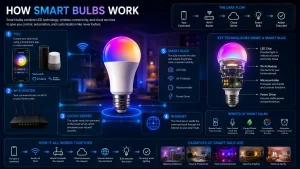
One of the most common questions people ask is how do smart bulbs work. The answer lies in the wireless communication technology built into the bulb.
Inside each smart bulb is a small communication chip that allows it to connect to a network or smart home ecosystem. Once connected, commands sent from a smartphone app or voice assistant are transmitted to the bulb through Wi-Fi, Bluetooth, Zigbee, Matter, or another supported protocol.
When a user changes a setting, such as turning the light on, adjusting brightness, or changing colors, the bulb receives the command and responds almost instantly. This communication happens electronically without requiring direct physical interaction.
Understanding how smart bulbs work helps homeowners appreciate why these devices can offer features far beyond traditional lighting systems.
How Do Smart Light Bulbs Work in Everyday Use?
Although many people search for how do smart light bulbs work, the practical experience is surprisingly simple. Once the bulb is installed and connected to the appropriate application, users gain access to various control options.
Most smart lighting systems allow users to create schedules, automation rules, and custom scenes. For example, lights can gradually brighten in the morning to simulate a natural sunrise or automatically dim during evening hours.
Many models also support geofencing technology. This feature uses a smartphone’s location to determine when someone arrives home or leaves, triggering lighting changes automatically without requiring user input.
Key Features of Smart Bulbs
Remote Control
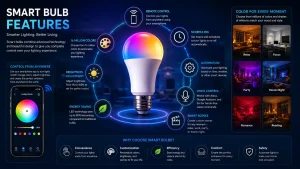
One of the most appealing benefits of smart lighting is the ability to control lights from virtually anywhere. Users can turn lights on or off even when they are away from home.
This capability is particularly useful for travelers who want to make their home appear occupied while they are away.
Remote access also provides peace of mind by allowing users to verify whether lights were left on accidentally.
Scheduling and Automation
Automation is one of the primary reasons many homeowners switch to smart lighting systems.
Schedules can be configured to match daily routines, ensuring lights activate and deactivate automatically at specific times. This reduces the need for manual control and improves convenience.
Advanced automation systems can even react to environmental conditions, occupancy, or other smart home devices.
Voice Assistant Compatibility
Most modern smart bulbs support integration with popular voice assistants.
Instead of opening an application, users can simply say commands such as turning lights on, dimming brightness, or changing colors.
This hands-free functionality makes smart lighting particularly useful when multitasking or moving throughout the home.
Color and Brightness Control
Many smart bulbs offer millions of color combinations and adjustable brightness levels.
Users can create customized environments for work, relaxation, entertainment, reading, or sleep. Different lighting scenes can be activated instantly through the app or voice commands.
This flexibility allows one bulb to serve multiple purposes throughout the day.
Do Smart Bulbs Use More Electricity?
A common concern among potential buyers is whether smart bulbs consume more electricity than traditional bulbs.
In most cases, smart bulbs are based on LED technology, which is significantly more energy efficient than incandescent and halogen alternatives. Although smart bulbs contain additional electronic components, their overall energy consumption remains relatively low.
The small amount of electricity required to power wireless communication features is generally minimal compared to the energy savings provided by LED technology. For most households, the difference in electricity usage is negligible.
As a result, smart bulbs often consume less energy overall than many conventional lighting solutions.
Do Smart Bulbs Use Electricity When Off?
Another frequently asked question is whether smart bulbs use electricity when off.
The answer is yes, but only a very small amount. When a smart bulb appears to be off, its wireless communication system often remains active so it can receive commands from apps, automation platforms, or voice assistants.
This standby power consumption is usually extremely low and is commonly referred to as phantom power or vampire energy.
For most users, the amount of electricity consumed while the bulb is off is so small that it has little impact on overall energy costs.
Smart Bulb vs Traditional LED Bulb
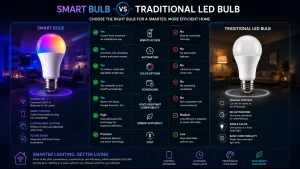
Traditional LED bulbs are efficient and long-lasting, but they lack connectivity and automation features.
Smart bulbs provide additional functionality such as scheduling, remote access, color control, automation routines, and voice assistant integration.
While smart bulbs generally cost more upfront, many homeowners find that the added convenience and flexibility justify the investment.
Choosing between the two often depends on individual needs, budget, and desired smart home functionality.
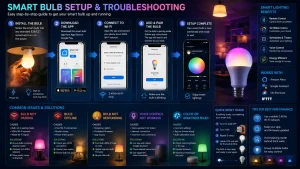
How to Set Up a Smart Bulb
Setting up a smart bulb is typically a straightforward process. Most manufacturers provide dedicated applications that guide users through installation and configuration.
The process usually involves installing the bulb, turning it on, opening the mobile application, and connecting it to a wireless network or smart home hub.
Once connected, users can begin creating schedules, customizing settings, and integrating the bulb with other smart home devices.
Most installations can be completed in less than fifteen minutes.
How to Reset a Smart Bulb
Over time, users may encounter situations where resetting a smart bulb becomes necessary. Connectivity issues, network changes, application errors, or device transfers are common reasons for performing a reset.
Most smart bulbs include a reset procedure that restores factory settings and removes previous configurations. The exact method varies depending on the manufacturer and model.
Resetting can often resolve pairing failures, communication problems, and software-related issues that prevent normal operation.
How to Reset a Smart Light Bulb Properly
Although reset procedures differ between brands, most smart light bulbs follow a similar process.
Many devices require users to switch the bulb on and off in a specific sequence. Others include reset commands within the companion application.
After a successful reset, the bulb typically enters pairing mode and becomes ready for setup again. Following the manufacturer’s instructions carefully helps ensure the process is completed correctly.
How to Reset a Feit Smart Bulb
Feit Electric smart bulbs use their own reset procedure that may differ slightly from other brands.
In many cases, users perform a reset by rapidly cycling the bulb on and off according to a specific pattern until the bulb begins blinking. The blinking indicator generally confirms that the device has entered pairing mode.
Because reset instructions may vary by model, users should always verify the exact procedure recommended for their specific Feit bulb before beginning the process.
Common Problems Smart Bulb Users Experience
Like any connected technology, smart bulbs can occasionally experience issues.
Common problems include Wi-Fi connectivity failures, offline status messages, delayed responses, failed automation routines, and pairing difficulties. These issues are usually related to network conditions, outdated firmware, or configuration errors.
Fortunately, most problems can be resolved through troubleshooting, firmware updates, improved network coverage, or factory resets.
Best Practices for Smart Bulb Performance
Maintaining reliable performance requires a few simple habits.
Keeping firmware updates helps improve security, stability, and compatibility. Strong Wi-Fi coverage also plays an important role in ensuring responsive control and consistent automation.
Users should periodically review schedules, remove outdated automation rules, and verify that smart home integrations remain properly connected.
These maintenance practices can significantly improve long-term reliability.
Are Smart Bulbs Worth It?
For many homeowners, smart bulbs provide a combination of convenience, automation, energy efficiency, and customization that traditional lighting cannot match.
The ability to control lighting remotely, create schedules, integrate voice assistants, and personalize environments makes smart lighting an attractive upgrade for both beginners and experienced smart home users.
While the initial cost is typically higher than standard bulbs, the added functionality often provides long-term value that extends well beyond simple illumination.
Conclusion
A smart bulb is far more than a standard light source. It combines LED efficiency with wireless connectivity, automation capabilities, voice control, and advanced customization options.
Whether you are researching how smart bulbs work, wondering about electricity usage, comparing lighting technologies, or learning how to reset a smart light bulb, understanding the fundamentals can help you make informed decisions.
As smart home technology continues to evolve, smart bulbs remain one of the simplest and most effective ways to create a more connected, convenient, and energy-conscious living environment.
FAQs About Smart Bulbs
1. What is a smart bulb?
A smart bulb is an internet-connected light bulb that can be controlled through a smartphone app, voice assistant, or smart home platform. Unlike traditional bulbs, it offers features such as remote control, scheduling, automation, and customizable lighting settings.
2. How do smart bulbs work?
Smart bulbs use wireless technologies such as Wi-Fi, Bluetooth, Zigbee, Z-Wave, or Matter to communicate with smartphones and smart home systems. These connections allow users to control lighting without relying solely on physical switches.
3. How do smart light bulbs work with voice assistants?
Most smart light bulbs integrate with voice assistants like Alexa, Google Assistant, and Siri. After linking the bulb to a compatible platform, users can control brightness, colors, and power settings using voice commands.
4. Do smart bulbs use more electricity than regular bulbs?
In most cases, smart bulbs consume less electricity than traditional incandescent bulbs because they use LED technology. Although they contain additional electronics, overall energy consumption remains relatively low.
5. Do smart bulbs use electricity when off?
Yes, smart bulbs typically consume a very small amount of standby power when switched off through the app. This allows them to remain connected and ready to receive commands.
6. Can smart bulbs work without Wi-Fi?
Some models support Bluetooth control and can operate without Wi-Fi at close range. However, remote access and advanced automation features usually require an internet connection.
7. How long do smart bulbs last?
Most smart LED bulbs are designed to last between 15,000 and 25,000 hours, depending on usage patterns and manufacturer specifications.
8. Are smart bulbs worth buying?
For many homeowners, smart bulbs provide added convenience, automation, energy efficiency, and customization options that make them a worthwhile investment.
9. Can smart bulbs change color?
Many models offer color-changing functionality, allowing users to choose from millions of colors and create customized lighting scenes for different activities and moods.
10. How do I reset a smart bulb?
The reset procedure depends on the manufacturer. Many smart bulbs require users to turn the bulb on and off multiple times in a specific sequence until it enters pairing mode.
11. How do I reset a smart light bulb after changing Wi-Fi?
In most cases, performing a factory reset removes old network settings and allows the bulb to connect to a new wireless network during setup.
12. How do I reset a Feit smart bulb?
Most Feit smart bulbs can be reset by rapidly cycling power according to the manufacturer’s instructions until the bulb begins blinking and enters pairing mode.
13. Why is my smart bulb not connecting to Wi-Fi?
Common causes include weak signal strength, incorrect passwords, unsupported network frequencies, outdated firmware, or router configuration issues.
14. Can smart bulbs improve home security?
Yes. Scheduled lighting and remote control features can create the appearance that someone is home, which may help discourage unwanted visitors while you are away.
15. Do smart bulbs need a smart home hub?
Not always. Many modern smart bulbs connect directly to Wi-Fi, while some Zigbee and Z-Wave models require a compatible hub for operation.