

How do smart light bulbs work? It’s a question many homeowners ask when exploring smart home technology for the first time. While smart light bulbs look similar to ordinary LED bulbs, they contain built-in electronics that allow them to communicate with smartphones, voice assistants, and smart home systems.
Unlike traditional bulbs that simply switch on when electricity flows through them, smart light bulbs can receive wireless commands and respond instantly. Whether you want to dim the lights, change colors, create schedules, or control lighting while you’re away from home, smart light bulbs make it possible without changing your home’s existing wiring.
Most smart light bulbs screw into standard light sockets, making installation straightforward. Once connected, they become part of your smart home and can work together with compatible smart switches, sensors, plugs, and automation routines.
In this guide, you’ll learn how do smart light bulbs work, what technology is built inside them, how they connect to your home network, how they communicate with mobile apps, and how they deliver convenient smart lighting every day.
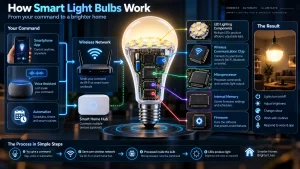
Table of Contents
- How Do Smart Light Bulbs Work?
- What Makes a Smart Light Bulb Different?
- The Technology Inside a Smart Light Bulb
- How Smart Light Bulbs Connect
- How Smart Light Bulbs Receive Commands
- How Smart Light Bulbs Change Brightness and Colour
- How Voice Control Works
- How Smart Light Bulbs Work with Automation
- Do Smart Light Bulbs Need Wi-Fi?
- Common Benefits of Smart Light Bulbs
- Frequently Asked Questions
- Final Thoughts
How Do Smart Light Bulbs Work?
The simplest answer to how do smart light bulbs work is that they combine LED lighting with wireless communication technology and a small built-in computer.
Inside every smart light bulb is a tiny microprocessor that constantly waits for instructions. These instructions may come from a smartphone app, a voice assistant, a smart home hub, or an automation routine.
When you send a command, the bulb receives the signal through its wireless connection. The processor immediately interprets the instruction and controls the LED accordingly.
For example, a smart light bulb can:
- Turn on or off
- Dim or brighten
- Change colour temperature
- Display millions of colours on supported models
- Follow schedules
- Activate custom lighting scenes
- Respond to automation routines
Unlike conventional light bulbs, smart light bulbs continue communicating with your smart home whenever electrical power is available.
What Makes a Smart Light Bulb Different?
Although smart light bulbs resemble standard LED bulbs, several important differences separate them from traditional lighting.
A conventional LED bulb simply converts electricity into light whenever power reaches the socket.
A smart light bulb, however, includes additional electronic components that allow it to communicate with other devices while providing far greater control over your lighting.
These additional components include:
- A wireless communication chip
- A microprocessor
- Internal memory
- Firmware
- LED lighting components
Together, these technologies transform an ordinary light bulb into a connected smart home device capable of automation and remote control.
The Technology Inside a Smart Light Bulb
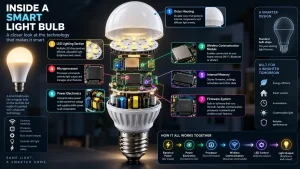
Every smart light bulb contains several components working together behind the scenes.
LED Lighting
The bulb uses energy efficient LED technology to produce bright, long-lasting illumination.
Wireless Communication
Depending on the model, communication takes place through Wi-Fi, Bluetooth, Zigbee, Thread, or Matter.
This wireless connection allows the bulb to receive commands without relying on physical switches alone.
Built-in Processor
The processor functions as the bulb’s internal computer. It interprets commands and controls brightness, colors, schedules, and automation settings.
Internal Memory
Network settings, schedules, and user preferences are stored inside the bulb so it can reconnect automatically after temporary power interruptions.
Firmware
Firmware controls how the smart light bulb operates. Manufacturers occasionally release updates that improve security, reliability, compatibility, and performance.
How Smart Light Bulbs Connect

To understand how do smart light bulbs work, it’s important to know how they communicate with your home network. Every smart light bulb uses a wireless connection to receive commands from your smartphone, voice assistant, or smart home platform.
Depending on the model, a smart light bulb may connect through Wi-Fi, Bluetooth, Zigbee, Thread, or Matter. Each connection method offers different advantages, but they all serve the same purpose—allowing you to control your lighting without relying only on a traditional wall switch.
Once the bulb is connected, it becomes part of your smart home network and can communicate with compatible devices whenever power is available.
Wi-Fi Smart Light Bulbs
Wi-Fi smart light bulbs connect directly to your home’s wireless router, making installation quick and straightforward.
After downloading the manufacturer’s app, you simply connect the bulb to your Wi-Fi network and begin controlling it from your smartphone.
Wi-Fi models are ideal for homeowners who want:
- Simple installation
- Remote control from anywhere
- Voice assistant compatibility
- No additional smart hub
Bluetooth Smart Light Bulbs
Bluetooth smart light bulbs connect directly to nearby smartphones or tablets without using your home’s Wi-Fi network.
These bulbs are suitable for smaller spaces where remote internet access isn’t necessary.
Although Bluetooth offers a shorter operating range, it provides a simple way to control lighting without adding more devices to your network.
Zigbee, Thread and Matter Smart Light Bulbs
Some smart light bulbs use dedicated smart home communication standards.
Zigbee creates a reliable mesh network that works well in homes with many connected devices.
Thread also uses mesh networking, improving reliability by allowing compatible devices to communicate directly with one another.
Matter is a smart home standard that helps devices from different manufacturers work together more easily, making it easier to build a flexible smart home system.
How Smart Light Bulbs Receive Commands
After the smart light bulb has been connected, it constantly waits for incoming instructions.
Whenever you interact with the companion app, the app sends a wireless command through your home network. Within moments, the bulb receives the instruction and carries out the requested action.
For example, the bulb can instantly do the following:
- Turn on
- Turn off
- Adjust brightness
- Change colour temperature
- Display different colours
- Activate saved lighting scenes
This communication happens so quickly that it feels almost instant to the user.
Modern smart light bulbs can also receive commands from multiple sources, including mobile apps, smart home hubs, voice assistants, and automated routines.
How Smart Light Bulbs Change Brightness and Colour
Unlike traditional bulbs, smart light bulbs allow you to customize lighting for different situations.
The built-in processor controls the LED components inside the bulb, adjusting the amount and type of light produced.
For white smart bulbs, this may involve changing brightness or switching between warm, neutral, and cool white lighting.
Color-changing smart light bulbs use multiple colored LEDs that work together to create millions of color combinations.
When you choose a color using the mobile app, the processor instantly adjusts each LED to produce the selected lighting effect.
This allows users to create different environments for activities such as:
- Reading
- Working
- Watching films
- Dining
- Gaming
- Relaxing
- Holiday decorations
How Voice Control Works
Voice control has become one of the most popular features of smart lighting.
After linking your smart light bulb to a compatible voice assistant, you no longer need to reach for your phone every time you want to adjust your lights.
Instead, a simple spoken command is sent through the smart home platform to the bulb.
Within seconds, the smart light bulb performs the requested action.
Common voice commands include:
- Turn on the kitchen lights
- Dim the bedroom lights
- Set the living room lights to warm white
- Change the lights to blue
- Turn off all lights
Because the communication happens automatically, voice control provides a convenient hands-free lighting experience.
How Smart Light Bulbs Work with Automation
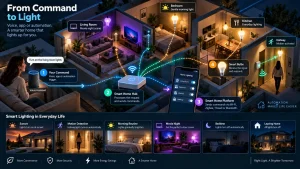
Automation is one of the biggest reasons homeowners choose smart lighting.
Instead of manually controlling lights every day, smart light bulbs can automatically respond to schedules, routines, or other smart devices.
For example, you can create routines that:
- Turn lights on before you arrive home
- Switch lights off every night at bedtime
- Gradually brighten the bedroom in the morning
- Change colours for movie night
- Activate lights when a motion sensor detects movement
- Turn off every light when everyone leaves the house
Because smart light bulbs can communicate with compatible smart home devices, they become part of a larger automated system that simplifies everyday living.
Many homeowners combine smart light bulbs with smart plugs, smart switches, security systems, cameras, and thermostats to build a fully connected home.