
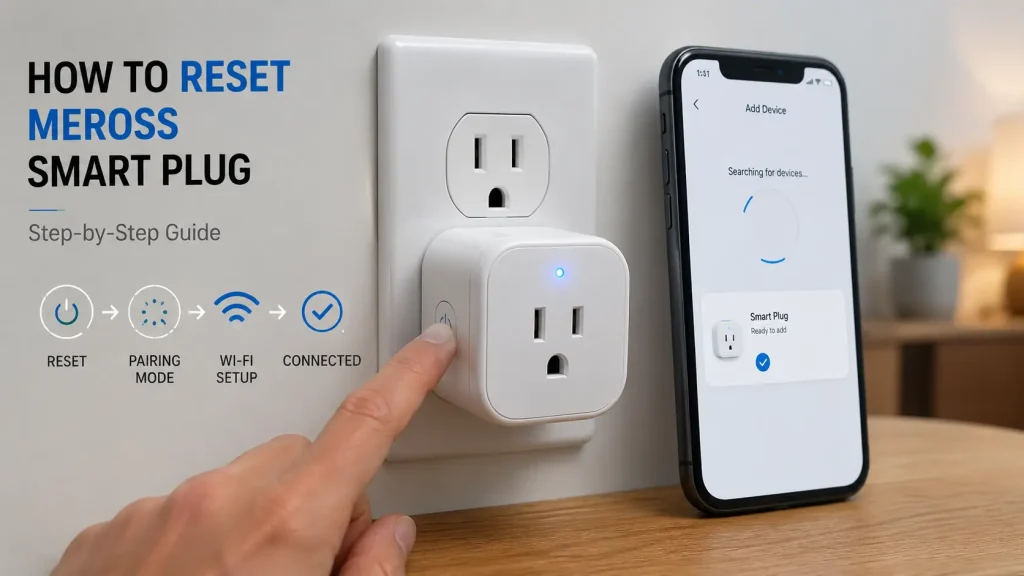
Meross smart plugs make it simple to control household appliances remotely, create schedules, and automate everyday routines through the Meross app or popular voice assistants. While these devices are generally reliable, you may occasionally experience connection issues, Wi-Fi problems, or pairing errors that prevent them from working as expected. If this happens, learning how to reset Meross smart plug devices is often the quickest way to restore normal operation. Whether you’ve changed your Wi-Fi network, moved the plug to a new location, or the device has become unresponsive, a reset can help clear existing settings and prepare it for a fresh setup.
In this guide, you’ll learn when you should reset your Meross smart plug, what to do before performing a reset, and how to reconnect the device afterward. We’ll also cover common troubleshooting tips and answer frequently asked questions to help you get your Meross smart plug working again.
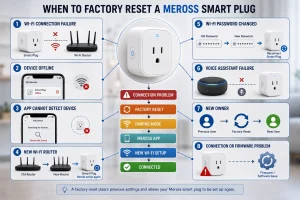
Table of Contents
- Why You May Need to Reset a Meross Smart Plug
- Things to Check Before Resetting
- How to Reset a Meross Smart Plug
- How to Reconnect Your Meross Smart Plug
- Common Problems After Resetting
- Tips to Prevent Future Connection Issues
- Frequently Asked Questions
- Final Thoughts
Why You May Need to Reset Your Meross Smart Plug
A Meross smart plug stores your Wi-Fi credentials, device settings, and account pairing information. If any of these settings become corrupted or outdated, the smart plug may stop responding or fail to connect to your network.
Resetting the device removes the saved configuration and restores the factory settings, allowing you to set it up again from scratch.
If you’re new to Meross smart plugs, it’s helpful to understand how they function before troubleshooting more advanced connection problems.
Common situations where a reset may be necessary include:
- The smart plug won’t connect to Wi-Fi.
- The Meross app cannot detect the device.
- The plug appears offline.
- Alexa or Google Assistant no longer controls the device.
- You replaced your Wi-Fi router.
- You changed your Wi-Fi name or password.
- You’re giving the smart plug to another person.
- Firmware or connection issues prevent normal operation.
In many cases, resetting the device is much faster than spending time trying multiple troubleshooting methods.
Things to Check Before You Reset a Meross Smart Plug
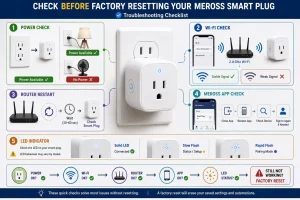
Although resetting usually resolves connection problems, it’s worth checking a few things first. Many issues can be fixed without restoring the device to factory settings.
Confirm the Smart Plug Has Power
Make sure the Meross smart plug is securely plugged into a working wall outlet. Test the outlet with another appliance if necessary.
Verify Your Wi-Fi Network
Most Meross smart plugs support 2.4 GHz Wi-Fi. If your phone is connected to a 5 GHz network during setup, the device may not pair correctly.
Also make sure your internet connection is working normally.
Restart Your Router
Temporary router issues can interrupt communication between your smart plug and the Meross cloud service. Restart your router and wait a few minutes before checking the device again.
Check the Meross App
Close the Meross app completely and reopen it. If the smart plug still appears offline, sign out of your account and sign back in before attempting a factory reset.
Look at the LED Indicator
The LED light provides useful information about the current status of your smart plug. A flashing indicator often means the device is ready for pairing, while a solid light usually indicates it is connected successfully.
If none of these steps solve the problem, performing a factory reset is usually the next step.
How to Reset a Meross Smart Plug
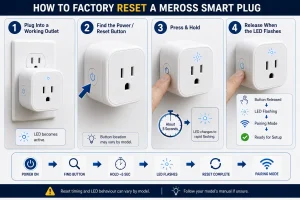
The reset procedure is straightforward and only takes a few minutes. Although different Meross models may have slight variations, the general process is the same for most Wi-Fi smart plugs.
Step 1: Plug the Device Into a Working Outlet
Insert your Meross smart plug into a powered wall outlet and wait a few seconds until the LED indicator becomes active.
Make sure the outlet is supplying power before continuing with the reset.
Step 2: Locate the Power Button
Most Meross smart plugs have a single button that serves as both the power switch and the reset button. It is typically located on the side or front of the device.
Step 3: Press and Hold the Button
Press and hold the button for about 5 seconds.
Continue holding it until the LED indicator begins flashing rapidly. This usually means the smart plug has entered pairing mode and the previous settings have been erased.
Step 4: Wait for the Reset to Finish
Release the button and allow the smart plug a few moments to complete the reset process.
Once the LED is flashing, the device is ready to be paired with your Wi-Fi network again.
What Happens After Resetting?
Resetting your Meross smart plug removes all previously saved settings, including:
- Wi-Fi network information
- Device pairing
- Automation schedules
- Timer settings
- Voice assistant connections
- Room assignments
The reset does not damage the device or affect its hardware. It simply restores the original factory settings so you can complete the setup again.
If you’re interested in learning why your device needs to be paired again after a factory reset, our guide on how smart plugs work explains how smart plugs communicate with your Wi-Fi network and mobile app.
How to Reconnect Your Meross Smart Plug
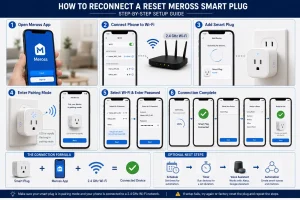
After the reset is complete, you’ll need to reconnect the smart plug using the Meross app.
Open the Meross App
Launch the Meross app on your smartphone or tablet and sign in to your account if necessary.
Connect Your Phone to Wi-Fi
Before adding the smart plug, make sure your phone is connected to your 2.4 GHz Wi-Fi network, as most Meross smart plugs do not support direct setup on 5 GHz networks.
Add a New Device
Tap Add Device in the Meross app and select your smart plug model.
The app will automatically search for nearby devices that are in pairing mode.
Complete the Setup
Follow the on-screen instructions to enter your Wi-Fi password and complete the pairing process.
After setup is finished, you can rename your smart plug, assign it to a room, recreate schedules, and reconnect it to Alexa, Google Assistant, or other supported smart home platforms.
Common Problems After Resetting
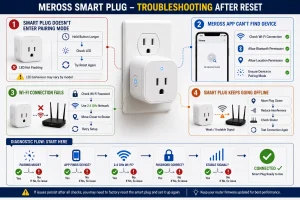
Sometimes a smart plug may still fail to connect even after a successful factory reset. Fortunately, most problems are easy to resolve.
The Smart Plug Doesn’t Enter Pairing Mode
If the LED never begins flashing, unplug the device, wait a few seconds, and try holding the power button again for a little longer.
The Meross App Can’t Find the Device
Check that Bluetooth and location permissions are enabled if required by your phone. Also verify that your smartphone is connected to the same Wi-Fi network you want the smart plug to use.
The Device Won’t Connect to Wi-Fi
Confirm that you’re using the correct Wi-Fi password and that your router is broadcasting a 2.4 GHz network.
Moving the smart plug closer to your router during setup can also improve the connection.
The Smart Plug Keeps Going Offline
Frequent disconnections are often caused by weak Wi-Fi coverage. Try moving the smart plug to an outlet with a stronger wireless signal or reducing interference from nearby electronic devices.
Tips to Prevent Future Connection Issues
Although resetting your Meross smart plug can resolve many problems, a few simple habits can help prevent connection issues in the future.
- Keep your router firmware up to date.
- Install firmware updates for your Meross smart plug whenever available.
- Maintain a stable Wi-Fi connection.
- Avoid unplugging the device unnecessarily.
- Place the smart plug within good range of your wireless router.
- Use clear names for multiple smart plugs to simplify management.
- Restart your router occasionally if you notice frequent connection interruptions.
These simple practices can help improve reliability and reduce the need for future factory resets.
Frequently Asked Questions
How do I factory reset a Meross smart plug?
Most Meross smart plugs can be factory reset by plugging the device into a powered outlet and pressing and holding the power button for about 5 seconds. Release the button when the LED indicator begins flashing rapidly. The flashing light indicates the device has been reset and is ready for setup.
Why won’t my Meross smart plug reconnect after resetting?
If your smart plug doesn’t reconnect, first check that your phone is connected to a 2.4 GHz Wi-Fi network. Verify your Wi-Fi password, move the device closer to the router, and make sure the smart plug is in pairing mode before adding it through the Meross app.
Will resetting my Meross smart plug delete my settings?
Yes. A factory reset removes the saved Wi-Fi connection, automation schedules, timers, voice assistant integrations, and other device settings. You’ll need to complete the setup again after resetting.
Can I reset my Meross smart plug without using the app?
Yes. The reset process is performed using the physical power button on the smart plug. However, you’ll need the Meross app afterward to reconnect the device to your Wi-Fi network and restore its settings.
How long does it take to reset a Meross smart plug?
The reset itself usually takes less than one minute. Once the LED starts flashing, you can begin reconnecting the device through the Meross app.
Should I reset my Meross smart plug regularly?
No. A factory reset should only be performed when you’re troubleshooting connection problems, changing your Wi-Fi network, or preparing the device for a new owner.
Final Thoughts
Knowing how to reset Meross smart plug devices can help you quickly resolve many common connection and setup problems. Whether your smart plug won’t connect to Wi-Fi, appears offline, or needs to be paired with a new network, a factory reset is often the simplest way to restore normal operation.
Before resetting, it’s always worth checking your power supply, Wi-Fi connection, and the Meross app, as many issues can be resolved without erasing the device’s settings. If a reset is necessary, following the correct steps will help you reconnect the smart plug quickly and continue enjoying reliable smart home automation.
If you’re looking to learn more, you may also find our guides on What Is a Smart Plug, How Do Smart Plugs Work, and How to Reset a Smart Plug useful for understanding smart plug technology and troubleshooting common issues across different brands.