
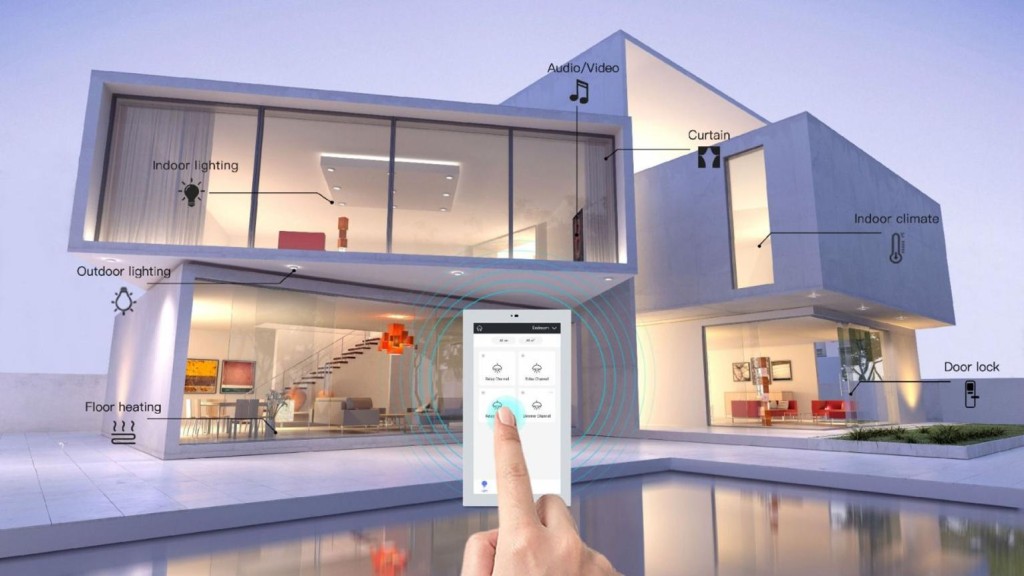
If you have ever wondered how lights can turn on automatically, thermostats can adjust themselves, or a smart lock can become part of a bedtime routine, you have already encountered the basic idea behind smart home automation.
But what exactly does smart home automation mean?
In simple terms, it is the use of connected devices and predefined rules to make household tasks happen automatically. Instead of manually controlling each device, a smart home automation system allows compatible products to respond to events, schedules, or specific conditions.
A smart home can contain many connected products. However, automation is what allows those products to respond automatically without requiring you to control each device manually.
What Is Smart Home Automation?
Smart home automation refers to using technology to control compatible devices and systems inside a home automatically.
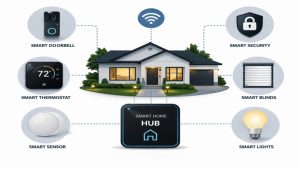
These devices can include:
- Smart lights
- Smart plugs
- Smart thermostats
- Smart locks
- Cameras
- Motion sensors
- Door sensors
- Smart speakers
- Connected appliances
The important difference between a smart device and automation is automatic behavior.
For example, controlling a smart bulb from a mobile app is smart control. By contrast, if that same bulb automatically turns on when motion is detected at night, it becomes part of a smart home automation routine.
How Does Smart Home Automation Work?
Most automation systems can be understood through three basic parts:
Trigger → Condition → Action
Trigger
A trigger is the event that starts an automation.
Common triggers include:
- A specific time
- Sunrise or sunset
- Motion detection
- A door opening
- Someone arriving home
- Someone leaving home
- A change in temperature
Condition
A condition determines whether the automation should continue.
For example:
Motion detected + after sunset
Here, motion is the trigger, while the time condition limits when the automation operates.
Action
The action is what the system does after the trigger and conditions are satisfied.
For example:
Motion detected → After sunset → Hallway light turns on
As a result, this basic structure can be used to create many different smart home routines.
What Are the Main Components?
Smart Devices
Smart devices perform the physical action.
A smart bulb changes lighting. Similarly, a smart lock controls a compatible door, while a smart thermostat adjusts temperature settings.
Sensors
Sensors detect changes in the environment.
Motion, temperature, contact, occupancy, and other sensors can provide information that triggers automation. For this reason, sensors are an important part of many automated routines.
Controller
A controller or smart home platform manages compatible devices and routines.
Some systems rely heavily on cloud services, whereas others can perform some functions locally. The exact architecture varies between platforms and devices.
Network
Devices need a communication method.
Wi-Fi is common, while other products may use technologies such as Thread, Zigbee, Z-Wave, Bluetooth, or Matter-compatible connections.
Therefore, compatibility is an important consideration when choosing products.
Smart Home Automation Examples
Automatic Lighting
A motion sensor can trigger a light when someone enters a room.
For example, this can be useful in hallways, bathrooms, garages, or other areas where automatic lighting is convenient.
Automatic Door Locking
A compatible smart lock can be included in a bedtime or leaving-home routine.
For example:
Bedtime → Selected lights turn off → Door locks
Temperature Automation
A compatible thermostat can follow a schedule.
For example:
Morning → Comfortable temperature
Daytime → Energy-conscious setting
Evening → Comfortable temperature
Security Notifications
A door or motion sensor can send a notification when a selected event occurs.
For example:
Door opens → Smartphone receives notification
In this way, users can receive alerts without constantly checking their devices.
What Are the Benefits?
Convenience
Automation can reduce repetitive tasks.
Instead of remembering to turn off every light, you can create a routine that handles selected devices automatically. As a result, everyday tasks can require less manual effort.
Control
Smart home systems can provide centralized control through supported apps, voice commands, or other interfaces.
In addition, centralized controls can make it easier to manage multiple compatible devices from one place.
Personalization
You can create routines around your own schedule.
For instance, a family with children may have different automation needs from someone who lives alone.
Monitoring
Connected sensors and security devices can help you stay informed about certain events.
For example, a door sensor may notify you when a selected door opens.
Efficiency
Automation can make it easier to manage lighting, temperature, and compatible appliances.
However, it is important to remember that automation does not automatically guarantee lower bills. Savings depend on how devices are configured and used.
Is a Smart Home the Same as a Smart Home Automation System?
Not exactly.
A smart home generally refers to a home containing connected devices that can be monitored or controlled.
In contrast, smart home automation adds rules that allow those devices to perform actions automatically.
For example:
Smart: You open an app and turn on the living-room light.
Automated: The living-room light turns on automatically when motion is detected after sunset.
This distinction is important because simply owning connected devices does not necessarily mean that a home has automated routines.
Is Smart Home Automation Difficult?
Basic automation does not have to be complicated.
Fortunately, many beginners can start with a small number of compatible devices and create simple routines.
For example, a smart plug and a compatible platform can be enough to create a basic schedule.
More advanced systems can become significantly more complex when many devices, sensors, rooms, and conditions are combined.
Therefore, starting small is usually a practical approach.
What Should Beginners Automate First?
Start with something you do repeatedly.
Good beginner examples include:
- Turning lights on and off
- Creating a bedtime routine
- Scheduling outdoor lights
- Monitoring doors
- Adjusting thermostat schedules
- Controlling a lamp with a smart plug
Once you understand how triggers and actions work, you can create more advanced routines.
Smart Home Automation and Privacy
Because connected devices may communicate over networks and use online services, privacy should be considered.
Before purchasing a device, review its privacy information and understand what data it collects.
In addition:
- Use strong passwords.
- Keep software updated.
- Secure your Wi-Fi.
- Enable multi-factor authentication when available.
- Remove unused devices from your system.
By following these basic practices, you can reduce some common security and privacy risks associated with connected devices.
Final Thoughts
So, what is smart home automation?
It is the technology that allows compatible household devices to respond automatically to triggers, conditions, schedules, or commands.
The concept is simple:
Something happens → The system recognizes it → The appropriate device responds.
Ultimately, whether you want automatic lights, smarter security, temperature control, or personalized daily routines, smart home automation can help create a home that works more intelligently around your lifestyle.