

Smart bulbs have become one of the popular addition to modern homes because they offer convenient features like remote control, scheduling, automation, and voice commands. As more people start using smart lighting, many wonder do smart bulbs use electricity when off and whether keeping them connected increases electricity costs.
The answer depends on what “off” actually means. If a smart bulb is turned off using a mobile app or voice assistant, it usually remains connected to your home’s electrical supply. Although the light is no longer producing illumination, the bulb continues using a very small amount of standby power so it can receive commands and respond instantly when needed.
However, if the wall switch is turned off and completely cuts power to the bulb, it can no longer stay connected and stops using electricity altogether.
In this guide, you’ll learn why smart bulbs use standby power, how much electricity they consume while off, what happens when power is disconnected, and whether standby power has a noticeable impact on your electricity bill.

Table of Contents
- Do Smart Bulbs Use Electricity When Off?
- Why Do Smart Bulbs Use Electricity When Off?
- How Much Electricity Do Smart Bulbs Use When Off?
- What Happens When You Turn Off the Wall Switch?
- Does Standby Power Increase Electricity Bills?
- Tips to Reduce Smart Bulb Energy Use
- Frequently Asked Questions
- Final Thoughts
Do Smart Bulbs Use Electricity When Off?
The short answer is yes, but only in certain situations.
If a smart bulb is switched off using a smartphone app, voice assistant, or automation routine, the bulb usually remains connected to electrical power. Even though the light is off, several electronic components inside the bulb continue operating in standby mode.
These components allow the bulb to stay connected to your home network and respond immediately whenever you send a command.
For example, when you say a voice command such as “Turn on the living room light,” the bulb receives that instruction because it has remained connected while the light was off.
Without standby power, remote control and automation would not be possible.
Although the bulb continues using electricity in this state, the amount is extremely small and is unlikely to have a noticeable effect on your monthly electricity bill.
Why Do Smart Bulbs Use Electricity When Off?
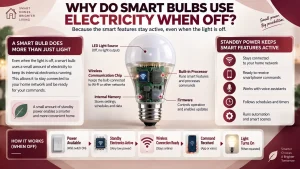
Many people assume that a light bulb stops using electricity completely as soon as it turns off. While this is true for traditional light bulbs, smart bulbs work differently.
A smart bulb is essentially a small computer combined with an LED light source.
Inside the bulb are several electronic components that continue operating whenever electrical power is available.
These include:
- Wireless communication chip
- Built-in processor
- Internal memory
- Firmware
Together, these components allow the bulb to:
- Stay connected to your smart home
- Receive commands from your smartphone
- Respond to voice assistants
- Follow schedules
- Run automation routines
- Receive firmware updates
Keeping these systems active requires a very small amount of standby electricity.
The bulb is not using electricity to produce light. Instead, it is simply maintaining its wireless connection so it is always ready to respond.
How Much Electricity Do Smart Bulbs Use When Off?
The amount of electricity used while a smart bulb is off is surprisingly small.
Most smart bulbs consume less than one watt of electricity while in standby mode. The exact amount depends on the manufacturer, wireless technology, and model, but standby power is generally very low.
For comparison, many everyday household devices also use standby electricity, including:
- Televisions
- Wi-Fi routers
- Game consoles
- Smart speakers
- Microwave ovens with digital clocks
Compared with the electricity required to produce light, standby power represents only a tiny fraction of a smart bulb’s total energy consumption.
For most households, this small amount of electricity has very little effect on monthly energy costs.
What Happens When You Turn Off the Wall Switch?
Understanding the difference between turning a smart bulb off using an app and switching off the wall switch is important.
When you turn a smart bulb off through its mobile app, voice assistant, or automation, the light stops producing illumination but the bulb continues receiving electrical power. This allows it to stay connected to your home network and respond whenever you want to turn it back on.
However, the situation changes when you use the wall switch.
Switching off the wall switch cuts the electrical supply to the bulb completely. Without power, the smart bulb immediately disconnects from your Wi-Fi, Bluetooth, Zigbee, Thread, or Matter network.
Once this happens:
- The bulb no longer uses standby electricity.
- Remote control stops working.
- Voice commands cannot reach the bulb.
- Scheduled routines cannot run.
- Automation is temporarily disabled.
The smart features become available again only after power is restored.
For this reason, many smart home users leave the wall switch in the “on” position and control the bulb using their preferred smart home app or voice assistant.
Does Standby Power Increase Electricity Bills?
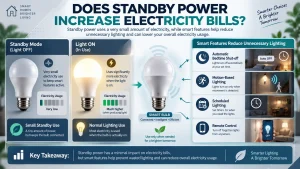
After learning do smart bulbs use electricity when off, many people naturally wonder whether standby power will noticeably increase their monthly electricity bill.
For most households, the answer is no.
The amount of electricity required to keep a smart bulb connected is extremely small. Most smart bulbs consume less than one watt while in standby mode, making their energy use almost insignificant when compared with many other household appliances.
In everyday use, the smart features often help save more electricity than the standby connection consumes.
For example, smart bulbs can automatically switch off when everyone leaves home, follow bedtime schedules, or turn off after a room has been empty for a certain period. These features help reduce unnecessary lighting and can lower overall electricity consumption.
Instead of focusing only on standby power, it’s better to consider how smart lighting improves the way lights are managed throughout the home.
Can Smart Bulbs Help Save Energy Even When They Use Standby Power?
Although smart bulbs continue using a small amount of electricity while connected, they also include features that help reduce wasted energy.
One of the biggest advantages is automation.
Rather than relying on someone to remember to switch lights off, smart bulbs can automatically follow routines based on your daily schedule or other smart home devices.
Some common examples include:
Automatic Schedules
Lights can turn on before you wake up and switch off automatically at bedtime without any manual input.
Remote Control
If you accidentally leave a light on after leaving home, you can switch it off using your smartphone from almost anywhere.
Motion-Based Lighting
When paired with compatible motion sensors, smart bulbs can automatically turn on when someone enters a room and switch off after the room becomes empty.
Smart Home Routines
Smart bulbs can work alongside compatible smart plugs, switches, cameras, and sensors to create routines that reduce unnecessary electricity usage throughout the day.
These features often save far more electricity than the tiny amount used for standby power.
Tips to Reduce Smart Bulb Energy Use
Smart bulbs are already designed to be energy efficient, but there are several simple ways to reduce electricity consumption even further.
Use Schedules Instead of Manual Control
Scheduling lights to turn off automatically helps prevent unnecessary energy use, especially when everyone is asleep or away from home.
Dim the Lights When Possible
Using lower brightness levels requires less electricity while still providing enough light for many everyday activities.
Create Lighting Groups
Grouping multiple smart bulbs together makes it easy to switch off an entire area of your home with a single command.
Review Your Automation Regularly
As your daily routine changes, updating your schedules and automation ensures lights are only used when needed.
Choose the Right Brightness
Installing a bulb with the appropriate brightness for each room helps avoid using more energy than necessary while maintaining comfortable lighting.
This approach allows you to enjoy all the convenience of smart lighting while keeping electricity consumption as low as possible.