
Home security is changing rapidly, and people now want more control, convenience, and peace of mind. Traditional keys can get lost, copied, or forgotten. However, modern technology offers a more flexible solution. A smart door lock allows you to control and monitor access to your home using features such as a smartphone app, PIN code, fingerprint, key card, or even voice control.
Unlike a conventional lock, a smart locking system can do much more than simply lock and unlock a door. For example, you may receive alerts when someone enters your home, create temporary access for guests, or check whether you remembered to lock the door. Therefore, it can become an important part of a connected and secure home.
What Is a Smart Door Lock?
A smart door lock is an electronic locking device that gives you more ways to control access to a door. Depending on the model, you may unlock it with a smartphone, fingerprint, PIN code, RFID card, Bluetooth connection, or a traditional key.
In simple terms, it replaces or upgrades the traditional locking experience with digital control.
For instance, imagine leaving home in a hurry and later wondering whether you locked the front door. With a compatible smart lock, you may be able to check the lock status through an app and lock the door remotely. As a result, you gain more control without physically returning home.
However, convenience is not the only advantage. Many smart locks also provide activity logs, access management, and alerts. Consequently, homeowners can understand who enters their home and when.
How Does a Smart Door Lock Work?
Although features vary from one model to another, most smart locks follow a similar basic process.
First, the lock receives an authorized command. This command may come from your smartphone, fingerprint, PIN code, keypad, or another approved method. Then, the lock verifies that the person or device has permission to access the door.
Once verified, an internal motor moves the locking mechanism and unlocks or locks the door.
Some locks connect directly to Wi-Fi, while others use Bluetooth, Zigbee, Z-Wave, Matter, or a separate smart home hub. Therefore, the level of remote access can vary depending on the device and your home setup.
Importantly, many models still include a backup option. For example, some provide a physical key, emergency power connection, or another method of entry if the battery runs low.
Key Benefits of a Smart Door Lock
Smart locks have become increasingly popular because they combine security with everyday convenience. Here are some of the most useful benefits.
1. Keyless Entry
One of the biggest advantages is the ability to enter your home without carrying a traditional key.
You might unlock the door using:
- A PIN code
- A fingerprint
- A smartphone
- A key card
- Bluetooth proximity
- A voice assistant, depending on the setup
As a result, you no longer need to search through your bag or pockets for keys every time you arrive home.
This can be especially helpful when you are carrying groceries, managing children, or returning home late at night.
2. Smart Door Lock Remote Access
Remote access is another feature that makes smart locks particularly useful.
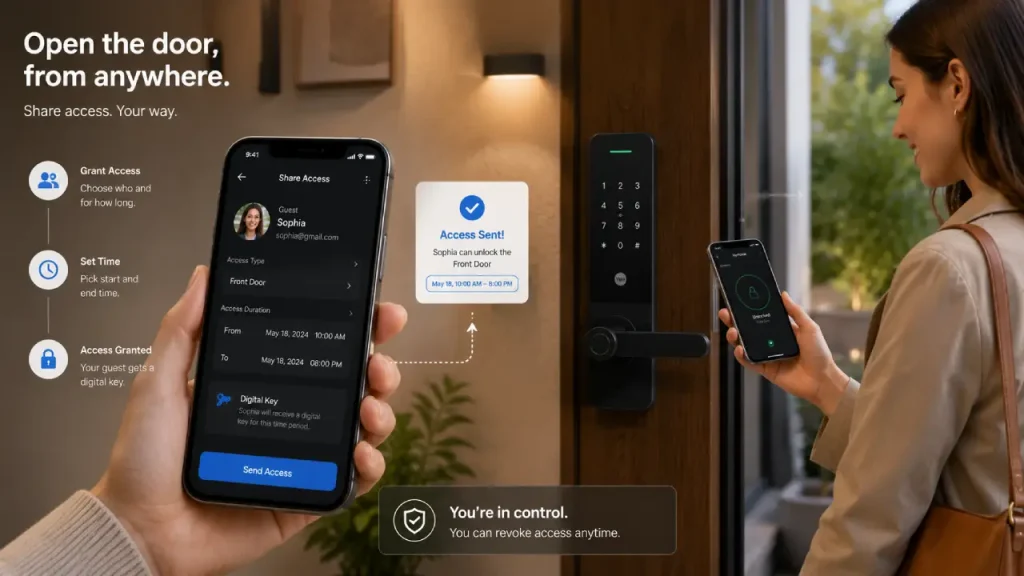
Depending on the model and connection setup, you may be able to lock or unlock your door from another location. For example, if a trusted family member arrives while you are away, you can provide access without physically handing over a key.
Moreover, you can often check whether the door is currently locked.
This feature adds convenience; however, you should always protect the associated app with a strong password and available security features such as two-factor authentication.
3. Temporary Access for Guests
Giving someone a physical key can create unnecessary problems. You may forget to collect it later, or the key could be copied.
A smart door lock can offer a more flexible alternative.
For example, you may create temporary access for:
- Family members
- House guests
- Cleaners
- Maintenance workers
- Delivery or service personnel, where appropriate
- Short-term rental guests
You can often set specific access times or remove access when it is no longer needed. Therefore, you maintain greater control over who can enter your home.
4. Activity Notifications and Access History
Some smart locks can notify you when the door is locked or unlocked. In addition, certain models keep an activity history.
This information can help answer simple questions, such as:
- Did someone arrive home safely?
- Was the door unlocked at an unusual time?
- Has a guest already entered?
- Did you remember to lock the door?
Of course, the exact information available depends on the lock and its privacy settings. Nevertheless, this added visibility can make home access easier to manage.
5. Smart Door Lock Auto-Locking
Forgetting to lock the front door is a common concern. Fortunately, many smart locks offer an auto-lock feature.
The lock may automatically secure the door after a set period or under certain conditions. As a result, you do not always need to remember the final step before leaving.
However, it is important to configure auto-lock carefully. You should also make sure that you have a reliable way to regain access if you accidentally leave without your phone or other entry method.
Important Smart Door Lock Features to Consider
Not every smart lock offers the same features. Therefore, you should consider your lifestyle and security needs before choosing one.
Multiple Unlocking Methods
A flexible lock should ideally offer more than one way to enter.
For example, a combination of keypad access and a physical backup key can be useful. Similarly, fingerprint access may provide convenience for family members.
Multiple options also help prepare for unexpected situations, such as a dead phone battery.
Battery Alerts
Most smart locks operate using batteries. Therefore, low-battery notifications are an important feature.
A good system should warn you before the battery becomes critically low. Additionally, check whether the lock provides an emergency charging option or physical key backup.
Do not wait until the battery completely fails before replacing it.
Access Management
Access management allows you to decide who can enter your home and, in some cases, when.
This feature is particularly useful for households with multiple family members or people who occasionally need temporary access.
Instead of sharing one permanent code with everyone, you can create separate credentials. Consequently, managing access can become more organized.
Smart Home Compatibility
Before purchasing a lock, check whether it works with your existing smart home ecosystem.
Compatibility can make automation easier. For instance, you might create a routine where certain supported devices respond when you arrive home.
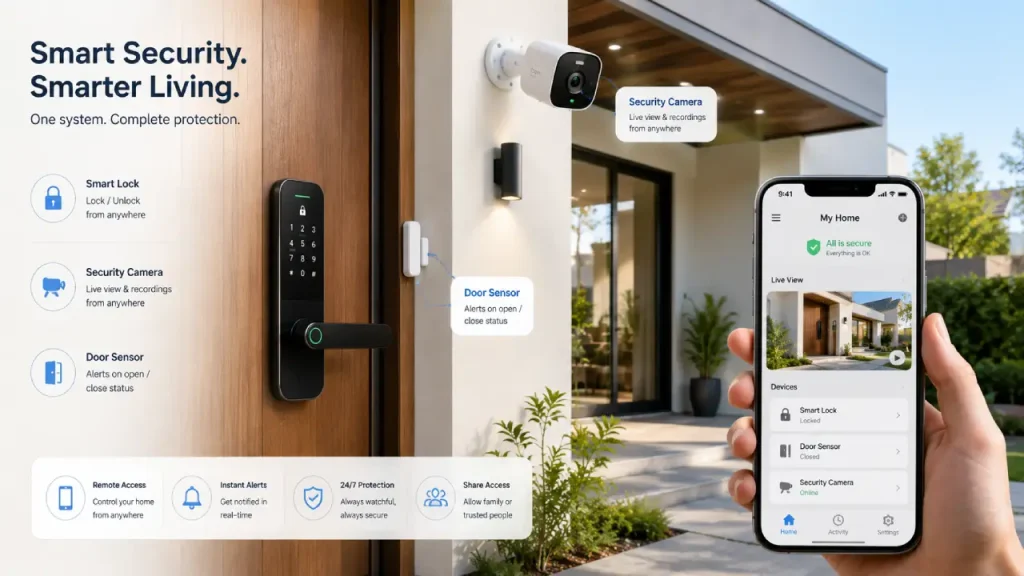
This is also a natural area to connect your home security setup. A smart lock can work alongside cameras, sensors, alarms, and monitoring systems to create a more complete security strategy.
Smart Door Lock and Smart Home Security
A smart lock can be useful on its own, but it becomes even more valuable when included in a broader security setup.
For example, a complete smart home security system may include:
- Smart security cameras
- Door and window sensors
- Motion sensors
- Smart alarms
- Video doorbells
- Mobile monitoring
- Connected lighting
- Smart locks
These devices can provide different layers of awareness and control.
For instance, a camera can help you see what is happening outside the entrance, while a door sensor can detect when the door opens or closes. Meanwhile, the smart lock manages authorized access.
Therefore, these devices do not necessarily replace one another. Instead, they can perform different roles within the same security system.
Are Smart Door Locks Secure?
This is one of the most common questions people ask.
The answer depends largely on the quality of the device, installation, account security, and how the lock is configured.
A smart lock still needs strong physical construction. Digital features alone cannot compensate for a weak deadbolt, poorly installed door frame, or damaged door.
Therefore, consider both physical security and digital security.
To improve security:
- Choose a reputable manufacturer with clear security and software support policies.
- Use strong, unique passwords for associated accounts.
- Enable two-factor authentication when available.
- Keep the lock’s firmware and companion app updated.
- Avoid sharing permanent access codes unnecessarily.
- Remove access for people who no longer need it.
- Use a strong door and properly installed hardware.
- Keep backup entry options available.
In other words, smart technology works best when you combine it with good security habits.
Potential Drawbacks You Should Know
Although smart locks offer many advantages, they are not perfect.
Battery Dependence
Because most models require battery power, maintenance is necessary. If you ignore low-battery alerts, you could eventually experience access problems.
Fortunately, many locks provide warnings or backup methods. Still, checking battery status regularly is a smart habit.
Connectivity Issues
Remote features may depend on Wi-Fi, Bluetooth, a hub, or another connection. Therefore, some functions may become temporarily unavailable if your network experiences problems.
For this reason, consider how the lock behaves when the internet goes down. A good setup should still provide a practical local or backup entry method.
Learning Curve
Some people prefer the simplicity of a traditional key. A smart lock may require initial setup, app installation, user management, and occasional maintenance.
However, once configured properly, daily use is often straightforward.
Privacy and Account Security
Connected devices may collect certain operational data, such as access events or device status. Therefore, review the manufacturer’s privacy policy and available security settings before making a purchase.
You should also secure the email account connected to your smart home system because account security can affect the security of connected devices.
How to Choose the Right Smart Door Lock
Choosing the right lock depends on more than appearance. Before buying, consider the following factors.
Check Your Door Compatibility
First, measure your door and examine the existing lock.
Not every smart lock fits every type of door. Therefore, check the manufacturer’s compatibility requirements before purchasing.
Consider:
- Door thickness
- Deadbolt type
- Door material
- Existing hardware
- Opening direction
- Indoor and outdoor exposure
Proper installation matters just as much as choosing the right product.
Choose the Access Methods You Actually Need
Do not pay for features you will never use.
For example, if several family members prefer fingerprints, biometric access may be useful. On the other hand, if you frequently give temporary access to visitors, keypad-based codes may be more practical.
Think about your daily routine first. Then choose features that genuinely make life easier.
Consider Your Existing Smart Home Setup
If you already use connected cameras, lights, sensors, or a smart home hub, compatibility should be a major consideration.
A smart door lock that integrates smoothly with your existing ecosystem can provide a better experience than a feature-rich device that works in isolation.
Therefore, check supported platforms and connection requirements before making your final decision.
Look for Reliable Backup Options
Technology can occasionally fail. Batteries can run low, phones can be lost, and networks can experience outages.
For that reason, backup access is extremely important.
Depending on the model, useful options may include:
- A physical key
- Emergency external power
- Multiple authorized users
- Keypad access
- Alternative local unlocking methods
A convenient smart lock should not leave you without a practical way to enter your own home.
Smart Door Lock Installation Tips
Installation requirements vary. Some smart locks allow you to replace only the interior part of an existing deadbolt, while others require a complete hardware replacement.
Before installation, make sure:
- The door closes and aligns properly.
- The existing deadbolt operates smoothly.
- The lock is compatible with your door.
- You follow the manufacturer’s installation instructions.
- You test all entry methods before relying on the lock.
After installation, test the device several times while the door is open. Then check locking and unlocking behavior with the door closed.
Additionally, create a backup plan before depending entirely on digital access.
Best Practices for Everyday Use
Once your lock is installed, a few simple habits can improve both convenience and security.
First, review who currently has access. Remove old guest codes and unused accounts.
Second, keep the software updated. Updates may improve performance and address security issues.
Third, monitor the battery level and replace batteries before they become critically low.
Finally, avoid sharing your main access code widely. Instead, create separate or temporary credentials whenever the lock supports them.
These small habits can make a significant difference over time.
Smart Door Lock vs Traditional Lock
Traditional locks remain simple and familiar. They do not require an app, internet connection, or battery in the same way electronic locks do.
However, smart locks provide additional control.
A traditional lock generally offers:
- Physical key access
- Simple operation
- Minimal digital setup
A smart lock may offer:
- Keyless entry
- Multiple access methods
- Temporary access codes
- Activity notifications
- Access management
- Remote features, depending on the model
- Integration with other smart home devices
Neither option is automatically right for everyone. The best choice depends on your security needs, budget, comfort with technology, and desired level of convenience.
Frequently Asked Questions
Is a smart door lock worth it?
A smart lock can be worth considering if you want keyless entry, easier access management, or the ability to monitor lock status. However, the best choice depends on your door, budget, and security requirements.
Can a smart door lock work without Wi-Fi?
Yes, many smart locks can still provide basic local functions without Wi-Fi. For example, Bluetooth, fingerprints, keypads, or physical keys may continue to work. However, remote features usually require an appropriate network connection or hub.
What happens if the battery dies?
The answer depends on the model. Many smart locks provide low-battery warnings before power runs out. Some also include physical key access or an emergency power option.
Can hackers unlock a smart lock?
Like other connected devices, smart locks can face digital security risks. However, strong account protection, software updates, secure setup, and reputable hardware can reduce risk. Physical door security also remains important.
Can I connect a smart lock with my smart home security system?
In many cases, yes. Compatibility depends on the specific devices and platforms. Before purchasing, check whether the lock works with your cameras, sensors, hub, or other smart home devices.
Final Thoughts
A smart door lock can make everyday home access more convenient while giving you greater control over who enters your property. Features such as keyless entry, temporary access, activity alerts, and automatic locking can simplify daily routines.
However, smart technology should support good security practices rather than replace them. Choose a lock that fits your door, offers reliable backup access, receives proper software support, and works with your broader security needs.
Moreover, if you want to build a stronger connected home, consider how your lock can work alongside cameras, sensors, alarms, and monitoring tools. When these devices are planned together, they can create a more practical and connected approach to home protection.
Ultimately, the right smart lock is not simply the one with the longest feature list. Instead, it is the one that matches your home, daily habits, and security requirements while remaining simple and reliable to use.