
Home security has changed significantly with the growth of smart home technology. Today, homeowners are looking for solutions that not only protect their property but also make everyday life more convenient. One innovation that has gained widespread attention is the smart lock. If you’ve been searching for what is a smart lock, you’re likely interested in understanding how this technology works and whether it’s the right choice for your home.
Unlike a traditional door lock that depends entirely on a physical key, a smart lock provides multiple ways to secure and unlock your door. Depending on the model, you can use a smartphone app, PIN code, fingerprint, Bluetooth connection, Wi-Fi, or even a compatible voice assistant. Many smart locks also allow you to monitor who enters your home, create temporary access for guests, and control your door remotely.
As smart homes become more common, smart locks are no longer limited to technology enthusiasts. They’re now used by homeowners, apartment residents, landlords, Airbnb hosts, and small business owners who want more control over property access without sacrificing convenience.
In this guide, you’ll discover how it works, the different types available, its key features, advantages, security considerations, and how to choose the right one for your home.
Table of Contents
- What Is a Smart Lock?
- What Is a Smart Lock and How Does It Work?
- What Is It Used For?
- Types of Smart Locks
- Benefits of Smart Locks
- Smart Lock vs Traditional Lock
- What Is a Smart Lock Buying Guide
- What Is a Smart Lock? Frequently Asked Questions
- Final Thoughts on What Is a Smart Lock
What Is a Smart Lock?
A smart lock is an electronic door lock that allows you to lock and unlock your door using digital access methods instead of relying only on a traditional key. It combines mechanical security with electronic technology, giving you more flexibility over how you access your property.
Most smart locks support one or more unlocking methods, including:
- Smartphone apps
- PIN codes
- Fingerprint recognition
- Bluetooth
- Wi-Fi
- Key fobs
- Voice assistants
- Physical backup keys
Because they offer multiple ways to unlock a door, smart locks can make everyday access more convenient while reducing the need to carry physical keys.
Many smart locks are designed for residential use, but they’re also commonly installed in:
- Apartments
- Holiday homes
- Rental properties
- Home offices
- Small businesses
- Airbnb accommodation
Depending on the model, a smart lock can either replace your existing lock completely or upgrade your current deadbolt while keeping the original key cylinder.
What Is a Smart Lock and How Does It Work?
Understanding how the technology works helps explain why smart locks are becoming increasingly popular.
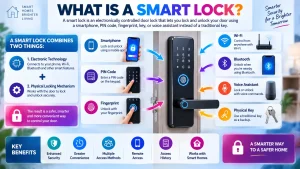
A smart lock contains an electronic locking mechanism that verifies an authorised user before unlocking the door. Instead of depending only on a metal key, it uses digital credentials that communicate with the lock securely.
Once a recognised user is verified, the internal motor activates the locking mechanism, allowing the door to open.
Different smart locks use different communication methods.
Wi-Fi Connectivity in a Smart Lock
Many smart locks connect directly to your home’s Wi-Fi network.
This allows you to control the lock remotely through the manufacturer’s mobile app, receive notifications, check lock status, and manage users even when you’re away from home.
Bluetooth Connectivity in a Smart Lock
Bluetooth smart locks communicate directly with your smartphone over a short distance.
This allows convenient keyless entry without requiring an active internet connection whenever you’re close to the door.
PIN Code Access
Many smart locks include an illuminated keypad.
Instead of carrying a physical key, authorised users simply enter their personal PIN code to unlock the door.
Some models support dozens of unique access codes for different family members or guests.
Fingerprint Recognition
Biometric smart locks use fingerprint recognition to verify authorised users.
A registered fingerprint can unlock the door within seconds, making entry both quick and convenient.
Smart Home Integration
Many smart locks integrate with popular smart home platforms.
This allows you to create routines such as automatically locking the front door every evening or unlocking it when approved family members arrive home.
What Is It Used For?
Many homeowners choose a smart lock because it offers more convenient access than a traditional lock.
Smart locks can be used in many different situations where flexible access management is important.
Some of the most common uses include:
Home Security
Smart locks provide homeowners with convenient keyless entry while allowing them to monitor who enters and leaves the property.
Many models also send notifications whenever the lock is used.
Rental Properties
Landlords and holiday rental hosts often use smart locks because temporary access codes can be created for new guests and removed after checkout without changing physical keys.
Family Access
Instead of making multiple copies of a house key, each family member can have their own access method.
Depending on the model, one person may prefer using the mobile app while another chooses a fingerprint or PIN code.
Home Offices
Smart locks can help control access to home offices by limiting entry to authorised users only.
Small Businesses
Many small businesses install smart locks to simplify employee access and reduce the need to manage large numbers of physical keys.
The flexibility of digital access makes smart locks useful in many everyday situations where traditional locks may be less convenient.
Types of Smart Locks
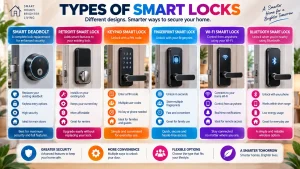
Now that you understand the basics, it’s worth knowing that there isn’t just one type. Smart locks are available in several designs, each offering different installation methods, unlocking options, and features to suit different homes and lifestyles.
Whether you’re upgrading your front door, securing a rental property, or adding smart technology to your office, choosing the right type of smart lock can make a significant difference.
What Is a Smart Lock Deadbolt?
A smart deadbolt is the most common type of smart lock for residential homes.
It replaces or upgrades your existing deadbolt while adding digital features such as smartphone control, PIN codes, remote access, and automatic locking.
Because it works with a traditional deadbolt mechanism, it remains one of the most popular choices for homeowners looking to improve both convenience and security.
What Is a Retrofit Smart Lock?
A retrofit smart lock upgrades the inside of your existing deadbolt without replacing the exterior lock.
From outside your home, the original key cylinder remains unchanged, while the inside gains smart functionality.
This option is ideal for homeowners who want smart features without changing the appearance of their front door.
What Is a Keypad Smart Lock?
Keypad smart locks allow users to unlock the door by entering a personal PIN code.
Many models support multiple user codes, making them useful for:
- Families
- Guests
- Holiday rentals
- Airbnb properties
- Small businesses
Temporary PIN codes can usually be created and deleted whenever needed.
What Is a Fingerprint Smart Lock?
Fingerprint smart locks use biometric technology to verify authorised users.
Instead of carrying keys or remembering PIN codes, you simply place a registered finger on the scanner to unlock the door.
Many homeowners choose this option because it provides fast and convenient access.
What Is a Wi-Fi Smart Lock?
A Wi-Fi smart lock connects directly to your home’s wireless network.
This allows you to:
- Lock and unlock the door remotely
- Check the lock status
- Receive activity notifications
- Manage user access
- Connect with compatible smart home devices
Wi-Fi smart locks are ideal for people who frequently travel or want complete remote control.
What Is a Bluetooth Smart Lock?
Bluetooth smart locks communicate directly with your smartphone when you’re nearby.
Because Bluetooth has a shorter operating range than Wi-Fi, these locks typically consume less battery power while still providing convenient keyless entry.
Benefits of Smart Locks
Once people understand about smart lock, they often want to know whether it’s worth installing one.
For many homeowners, smart locks offer several practical advantages over traditional locking systems.
Convenient Keyless Entry
One of the biggest benefits is not having to rely on physical keys for everyday access.
Instead, you can unlock your door using a smartphone, keypad, fingerprint, or another approved method.
This can be particularly useful when your hands are full or when family members prefer different ways of entering the home.
Better Access Management
Managing access becomes much easier with a smart lock.
Instead of making duplicate keys, you can create digital access for family members, trusted friends, cleaners, or contractors.
If someone no longer needs access, you can simply remove their permission without replacing the lock.
Remote Access
Many smart locks allow you to check whether your door is locked and control it remotely using the manufacturer’s mobile app.
This feature is useful if you forget to lock the door before leaving home or need to let someone in while you’re away.
Activity History
Many smart locks keep a record of lock activity.
Depending on the model, you can see when the door was locked or unlocked and which user accessed the property.
Automatic Locking
Auto-lock is one of the most popular smart lock features.
Instead of worrying whether you remembered to lock the front door, the lock can automatically secure itself after a chosen period once the door closes.
Smart Home Automation
Many smart locks work with compatible smart home platforms.
This allows you to create routines such as:
- Locking the front door every night.
- Unlocking the door when authorised family members arrive.
- Coordinating with smart lights and security cameras.
- Activating home security routines automatically.
Are Smart Locks Safe?
One of the first questions homeowners ask after learning about smart lock is whether these devices are secure enough for everyday use.
The answer is yes—when they are installed correctly and used according to the manufacturer’s recommendations.
Modern smart locks often include security features such as:
- Encrypted wireless communication
- User authentication
- Activity history
- Tamper alerts
- Automatic locking
- Individual user permissions
- Firmware updates
Just like smartphones and other connected devices, smart locks should be kept up to date with the latest firmware to ensure the best performance and security.
Using strong account passwords and reviewing user permissions regularly also helps protect your smart home.
If you’d like to explore this topic in more detail, read our complete guide “Are Smart Locks Safe?”, where we discuss security features, common concerns, and best practices.
Smart Lock vs Traditional Lock
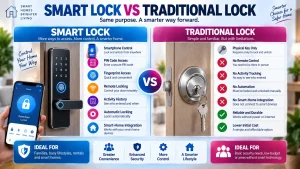
Understanding also means knowing how it compares with a traditional lock.
Both options are designed to secure your property, but they offer different ways to manage access.
| Feature | Smart Lock | Traditional Lock |
|---|---|---|
| Physical Key | Usually included | Yes |
| Smartphone Control | Yes | No |
| PIN Code Access | Available on many models | No |
| Fingerprint Access | Available on some models | No |
| Remote Locking | Available on many models | No |
| Activity History | Available on many models | No |
| Smart Home Integration | Yes | No |
| Auto-Lock | Available | No |
Traditional locks remain a dependable choice for many homes. However, smart locks provide additional convenience by offering multiple unlocking methods, remote management, and integration with other smart home devices.
What Is a Smart Lock Buying Guide?
Choosing the right smart lock depends on your home, your lifestyle, and the features that matter most to you.
Before buying, consider the following factors.
Door Compatibility
Make sure the smart lock is compatible with your existing door, deadbolt, and door thickness.
Unlocking Methods
Choose a lock that supports the access methods your household will use most often.
These may include:
- Smartphone app
- PIN code
- Fingerprint
- Bluetooth
- Physical key
Battery Life
Most smart locks operate using replaceable batteries.
Look for models that provide battery level notifications and offer several months of normal use before replacement is required.
Smart Home Compatibility
If you already use smart home devices, select a lock that integrates with your preferred platform.
Security Features
Compare features such as encrypted communication, activity history, user management, automatic locking, and firmware updates before making your decision.